Private networking allows you to group servers within the same location, enabling private communication between them
Latitude.sh servers are configured with a public and a private interface on a Layer 3 network topology by default. With private networking, you can switch to a Layer 2 topology, allowing for L2 traffic between two or more instances.This applies to both bare-metal servers and the virtual machines running on them: a VM can attach to the same private network and reach the bare-metal hosts — and other VMs — over Layer 2, using the same VLAN and subnet.Layer 2 packets don’t go through the network layer, and traffic is not filtered in any way. Latitude.sh does not charge for traffic from private networks, either inbound or outbound.
Private networking provides a myriad of benefits, with the most important ones being:
Traffic doesn’t go through the public internet, enhancing security.
Private network traffic doesn’t count against your bandwidth quota.
This feature is especially useful when you don’t want or need traffic from specific servers going through the public internet. Common use cases include:
Connecting a database server to a web application privately.
Managing internal services like DHCP.
Setting up Kubernetes clusters with direct node communication.
Letting virtual machines communicate privately with the bare-metal hosts they run on.
The first step is to create a Virtual Network — commonly referred to as VLAN.
From the dashboard
Using the API
1
Create a VLAN
Log in to the dashboard, select a
project, navigate to Networking → Private networks in the sidebar menu,
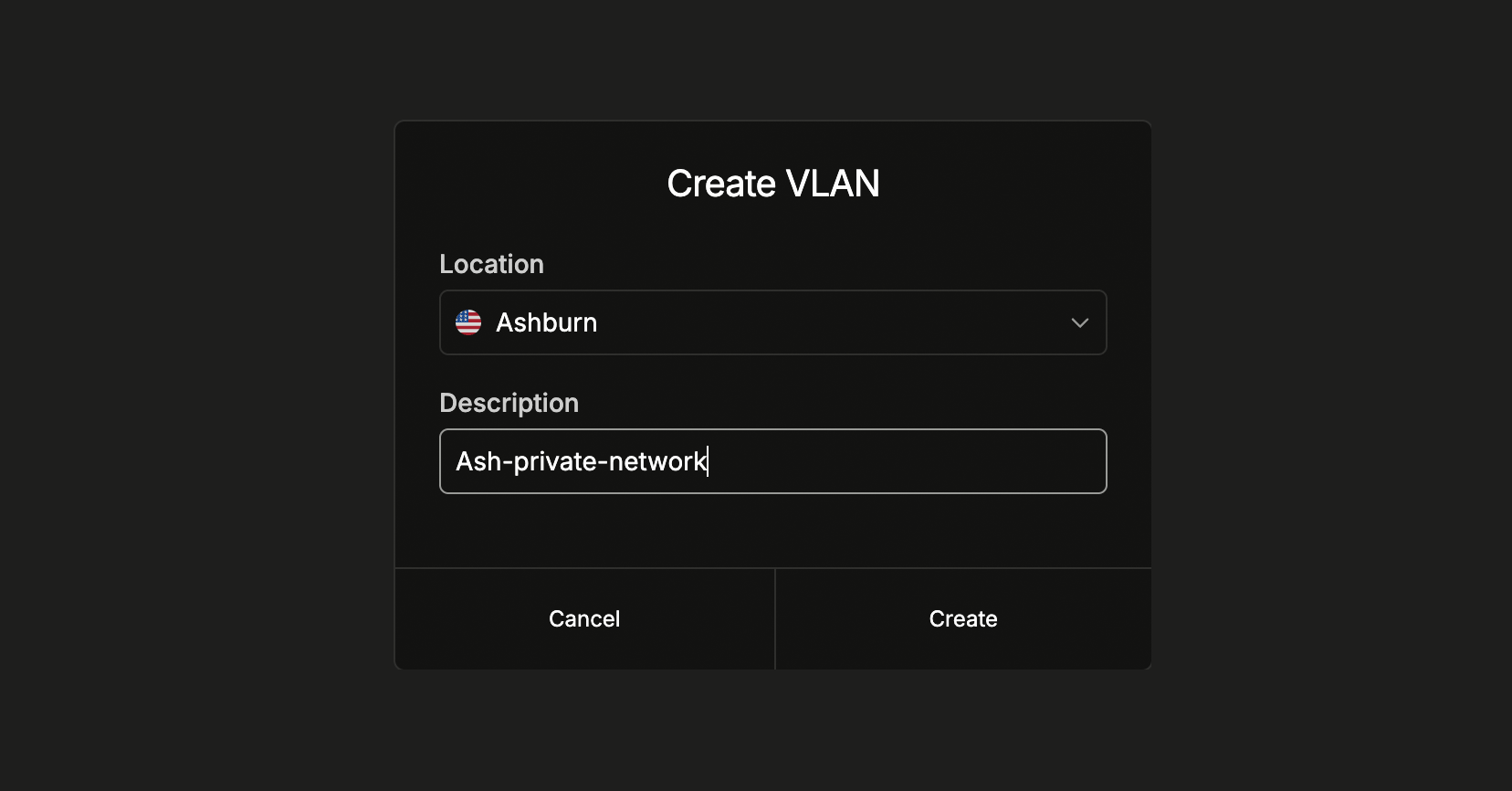
and click Create VLAN. Select the location and add a description to help
you identify what the VLAN is used for.
After creating the VLAN, assign at least two servers to allow the server’s private IPs to communicate.
1
Assign servers to the VLAN
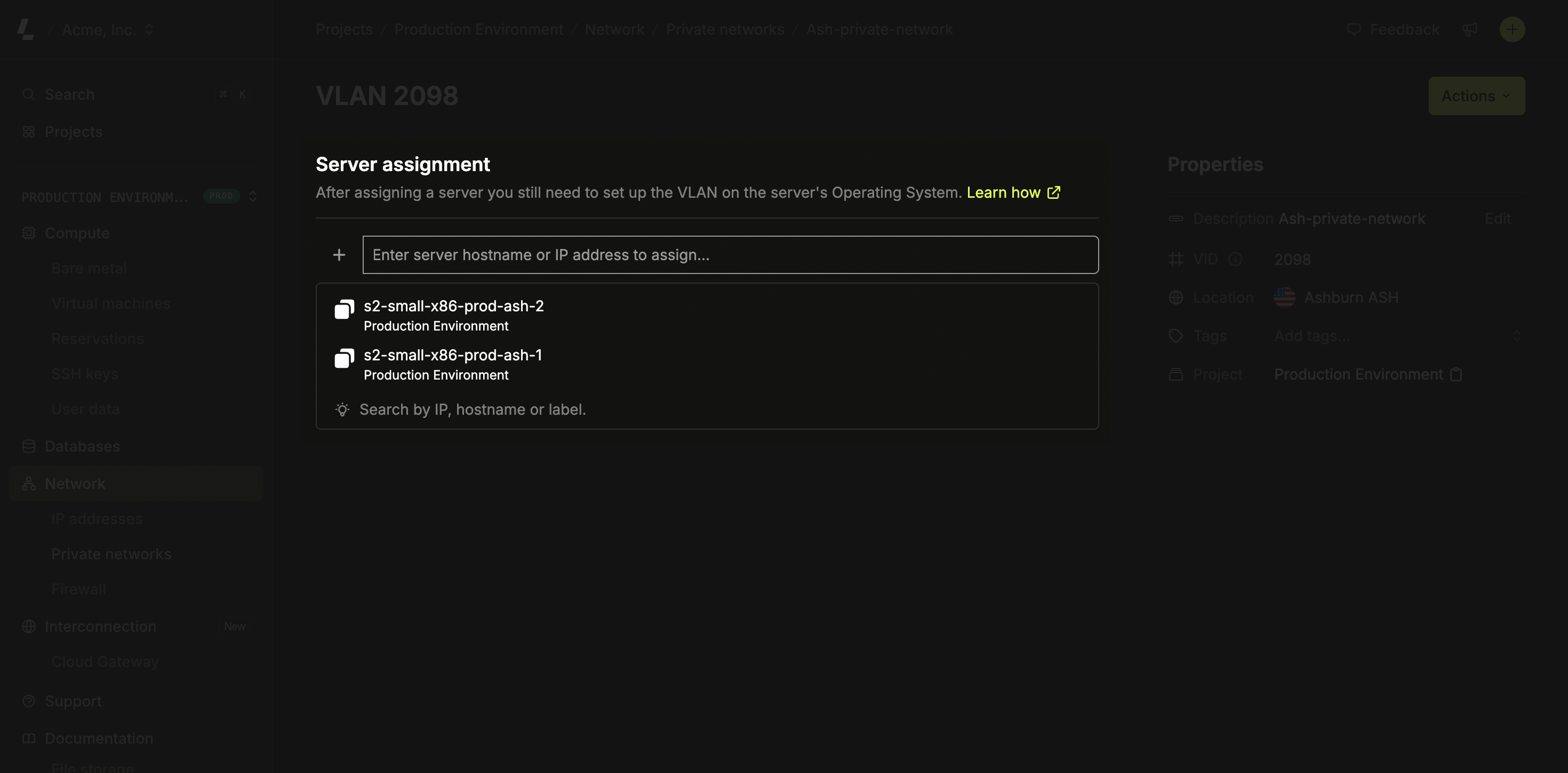
Go to the Virtual Network you created and click Assign. Select the
server you’d like to assign - only servers from the facility the virtual
network was created in will be listed. Save and wait a few seconds while the
network is provisioned.
You assign servers to the VLAN here. Virtual machines join the same private network through the host they run on — attach a NIC to the VLAN on the host’s private interface, then configure the guest as shown in Step 3 → Virtual machines.
The network provisioning on Latitude.sh switches is handled automatically after you assign your first server to a VLAN. Latitude.sh has no access to your servers, an additional step is required, and you need to configure the VLAN on your Operating System.
Ubuntu
Virtual machines
Windows
CentOS and RedHat Enterprise Linux
1
Load the 8021q module into the kernel and install the VLAN package
sudo modprobe 8021qsudo apt install vlan
2
Change netplan
Change the Netplan configuration file in /etc/netplan/50-cloud-init.yaml and add the configuration below to the end of the file.
Replace {{VID}} with the VID value from the VLAN you created.
Replace 10.8.0.1 with a private address of your choice. This address becomes the private IP of the server within the VLAN. It can be anything you want, but each server in the same VLAN needs a different IP.
Replace eno2 with the correct interface name. For servers with bonded interfaces, use bond0.
  vlans:
    vlan.{{VID}}:
      id: {{ VID }}
      link: eno2
      addresses: [10.8.0.1/24]
The vlans section should be at the same indentation level as the ethernets key.
3
Adding a default route
Due to eventual changes in Netplan versions, to use Cloud Gateway, you need to define a default route to ensure proper network routing.
You can do that by adding the following routes section under the vlans key:
routes:
  - to: 10.8.0.0/16
    via: 192.168.0.1
Replace 10.8.0.0/16 with the network prefix you want to reach through eno2.
Replace 192.168.0.1 with the gateway IP address for your network (typically the first IP of your subnet).
4
Save the file and apply the configuration
sudo netplan apply
This configuration is persistent, you don’t need to do anything else.
When the server runs virtual machines, the host’s virtual bridge applies the VLAN tag for the guest. Do not tag the VLAN again inside the guest — a vlans: block in the VM double-tags the frames (QinQ), the switch drops them, ARP never resolves, and you’ll see Destination Host Unreachable.
Never copy the Ubuntu tag-in-guest pattern (the vlans: block) into a VM. On bare metal the guest tags the VLAN; on a VM the host bridge already does. Inside the guest, the private NIC must be a plain, untagged interface.
1
Attach a second NIC to the VM
Latitude.sh virtual machines: attach the VLAN with POST /virtual_machines/{virtual_machine_id}/network_attachments, optionally with a static address. A running VM restarts so the new NIC reaches the guest. After the restart, GET /virtual_machines/{virtual_machine_id}/network_attachments returns the NIC’s mac_address and the address you set.
VMs whose apply_network_on_boot is true configure the NIC on boot when the attachment has an address. Nothing else to do.
In every other case (VMs created before that option existed, VMs with it set to false, or an attachment without an address), configure the NIC as described in the next steps.
Your own virtualization host: attach a second network interface to the VM, connected to a VLAN-backed network whose VLAN ID matches the VLAN you created on Latitude.sh. That network’s uplink must be the server’s private NIC (eno2).
The VLAN ID must match the bare-metal VLAN’s VID.
This is configured on the virtualization host, not in the guest OS.
2
Configure the guest NIC
Configure the private NIC as a plain, untagged interface in a configuration of your own, matched by its MAC address: interface names differ between images (enp2s0, eth1). Do not add a vlans: block.Ubuntu and Debian (netplan): put the private NIC in its own file, /etc/netplan/60-private.yaml, instead of editing /etc/netplan/50-cloud-init.yaml. Cloud-init can rewrite 50-cloud-init.yaml; with your configuration in a separate file, it keeps working through any cloud-init rewrite.
Replace 02:f2:41:f6:6a:5e with the second NIC’s MAC address (run ip -br link inside the guest to find it).
Replace eth1 with the ID that 50-cloud-init.yaml uses for the same MAC address, so your file overrides that entry. If 50-cloud-init.yaml has no entry for this NIC, any ID works.
Replace 10.8.0.2/24 with a private address in the same subnet and prefix as the bare-metal servers on this VLAN. Each host in the VLAN needs a unique IP.
Do not set a gateway on this interface: keep the default route on the public NIC (enp1s0) only.
AlmaLinux and Rocky Linux (NetworkManager): add a connection of your own, bound to the NIC’s MAC address:
Replace 02:f2:41:f6:6a:5e and 10.8.0.2/24 as described for netplan above.
ipv4.never-default yes keeps the default route on the public NIC.
Until a connection of yours matches the NIC, NetworkManager may hold it with its automatic Wired connection 1 profile (DHCP). Your connection takes over when you bring it up.
The NIC gets a new MAC address each time the network is attached to the VM. After detaching and attaching the network again, update the MAC address and apply the configuration again: a stale MAC address leaves the NIC without its address. With netplan, update macaddress in your file; with NetworkManager, run sudo nmcli connection modify private 802-3-ethernet.mac-address <new-mac>. When you detach the network for good, remove your configuration first (sudo rm /etc/netplan/60-private.yaml && sudo netplan apply, or sudo nmcli connection delete private), then detach.
Remove any leftover vlans: / vlan.{{VID}} stanza and any stray addresses on unrelated subnets before applying. Use static IPs on every NIC — do not run DHCP on more than one interface, or the DHCP clients race over the default route and cause intermittent packet loss.
3
Apply the configuration and verify Layer 2
sudo netplan generatesudo netplan apply
sudo nmcli connection up private
With netplan, running netplan generate first surfaces silent errors before you apply. The address can take a few seconds to appear on the interface. Then verify Layer 2 reachability from the VM to a bare-metal host on the same VLAN. Replace enp2s0 with the private NIC’s name inside the guest (shown by ip -br link, next to the MAC address you used in the file):
A reply confirms the fix. Destination Host Unreachable means ARP failed — the NIC is still double-tagged, or the VLAN ID, NIC, or subnet don’t match the bare-metal side.
This will show you how to set up multiple VLANs on a single network interface when using Windows Server 2012 or later.
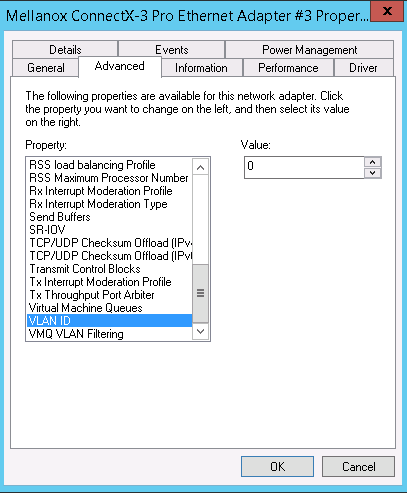
If you want to configure a single VLAN in the interface, go to Network Connections > Properties > Advanced tab > Select the VLAN ID field and add the desired value.
If you want multiple VLANs in the same interface, make sure that the property VLAN ID is set to 0 - otherwise, it will not work.
Access your server’s IPMI via the Remote access feature.
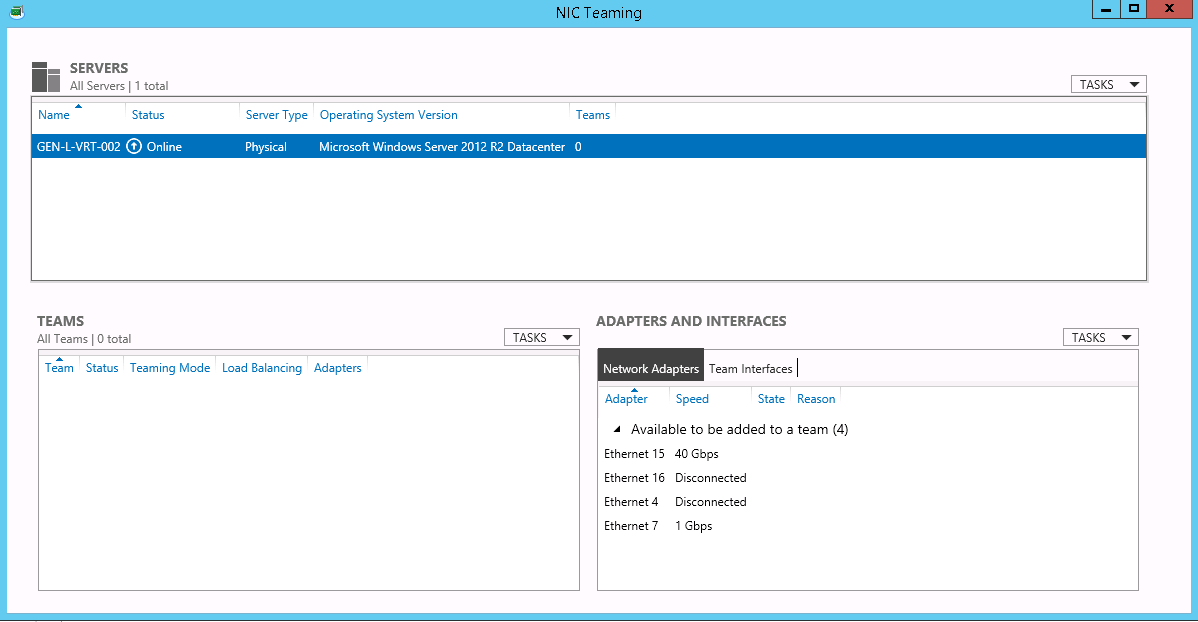
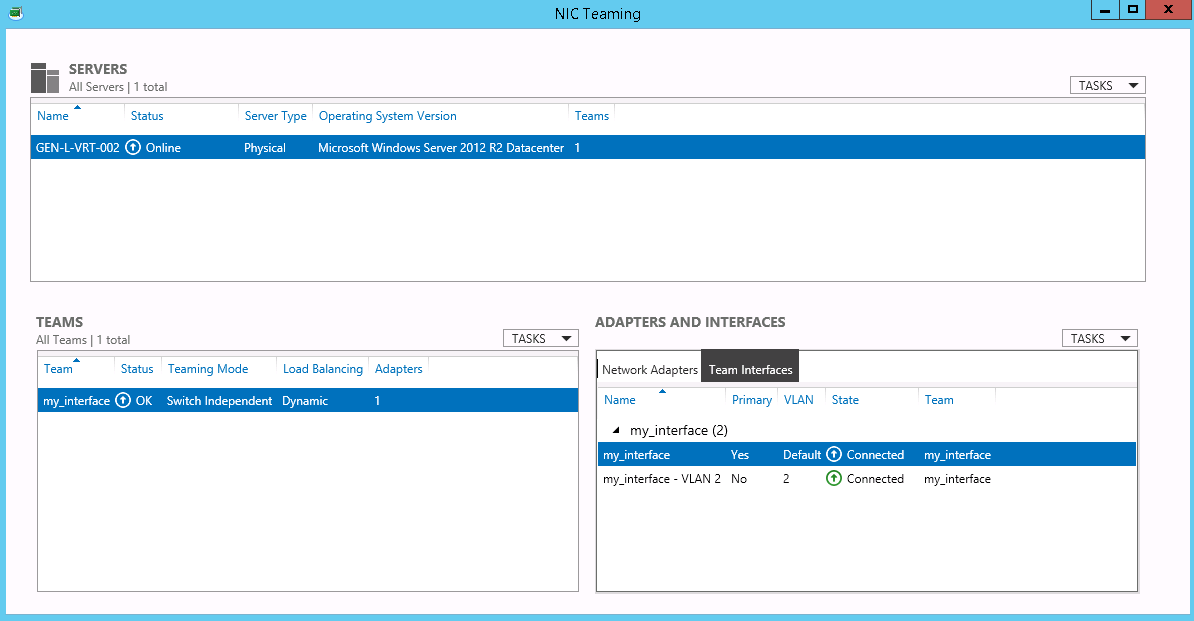
On your IPMI interface go to Server Manager > Local server and click on NIC Teaming.
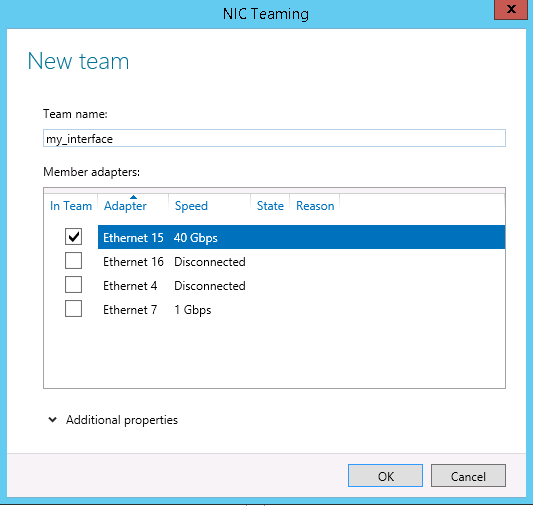
Create a new Team with a single interface by going to Teams > Tasks > New Team. Select the desired interface (e.g. 40GbE) and give it a name. Once you create the Team, your IP configuration will be cleaned and your server’s internet connection will be lost until the end of the process. Select your secondary interface for the private VLAN.
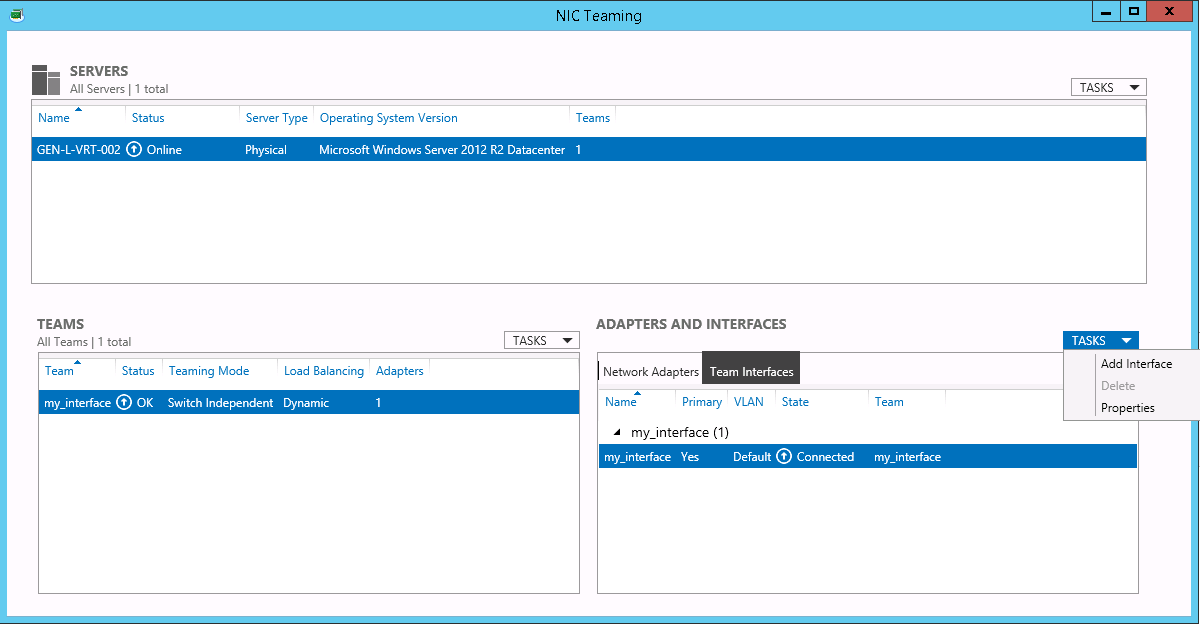
Go to Adapter and Interfaces and click on TASKS > Add Interface. The first interface needs to have the VLAN ID 0 (zero) or Default.
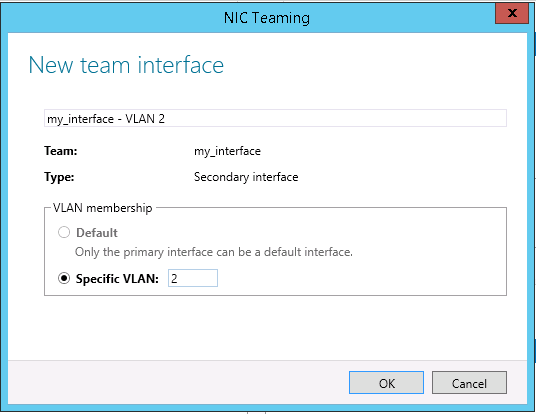
Configure the specific VLAN and click OK. The VLAN ID that you need to configure is the same displayed on your dashboard.
To add another VLAN interface on the same port, repeat step #4.
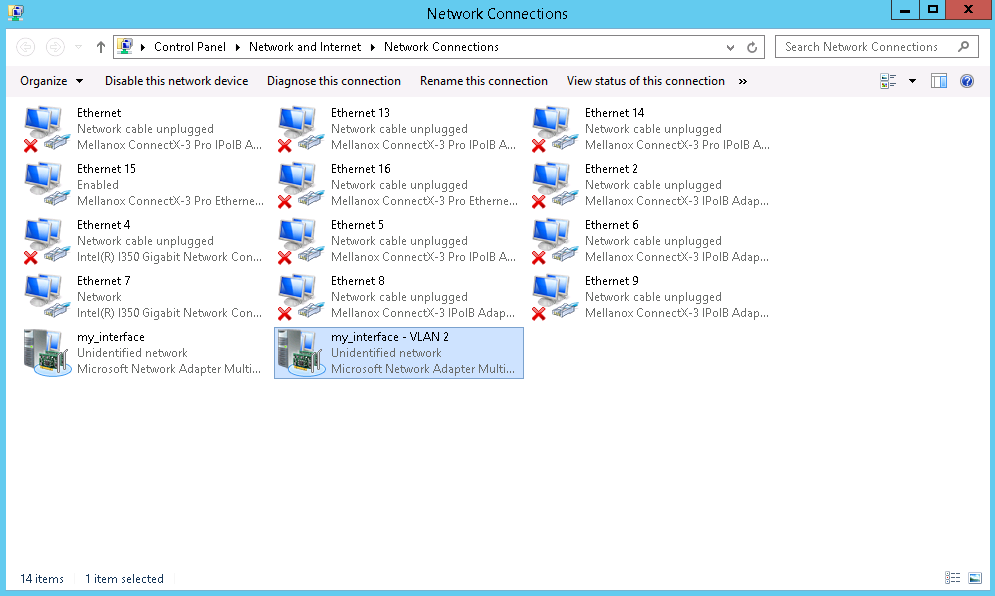
To assign an IP address to the new interface, click on Network Connections, and find the VLAN interface you have just added. Then, configure the IP similarly to any other interface. You need to configure the VLAN 0 with your public IP.
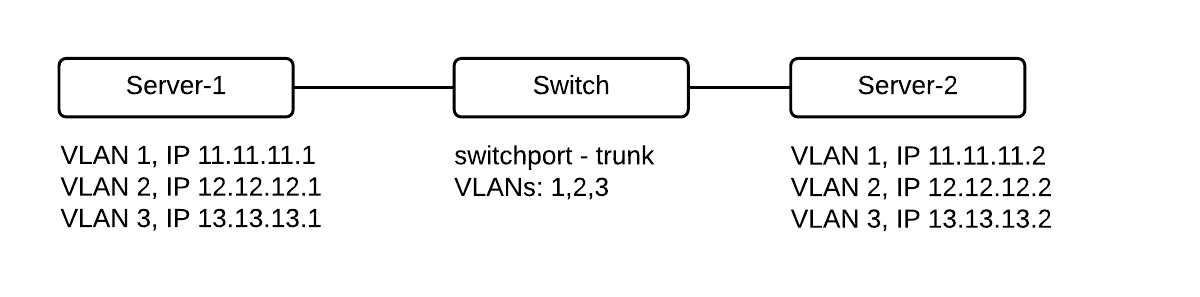
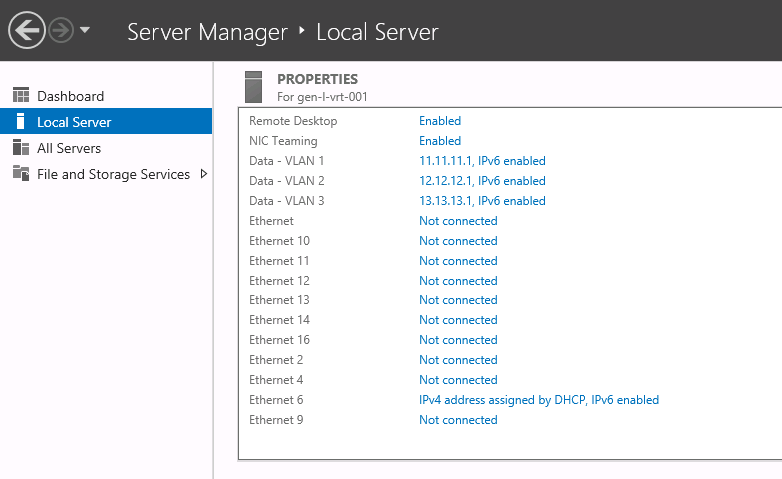
You can configure any IP address in your private VLAN (e.g.: 10.10.10.1/24) and you don’t need to configure a Gateway in the private interfaces. Gateway information is only mandatory for ‘Public’ Interfaces.Let’s say you created three VLAN interfaces (VLANs 1,2,3) on the teaming interface and add three IP addresses, here is what you should see on the Server Manager window:Troubleshooting
If you try to configure multiple VLANs, make sure that the value of the VLAN ID field in the properties Advanced tab is equal to 0.
Do not configure the primary virtual interface with the VLAN ID, as it needs to be on its default configuration (VLAN ID 0). When the port configuration is set up to native VLAN, do not change this VLAN configuration.
1
Load the 8021q module
In Red Hat Enterprise Linux and CentOS 7, the 8021q module is loaded by default. If necessary, you can make sure that the module is loaded by issuing the following command as root:
modprobe --first-time 8021qmodprobe: ERROR: could not insert '8021q': Module already in kernel
2
Display module information
To display information about the module, issue the following command:
modinfo 8021q
3
Additional options
See the modprobe(8) man page for more command options.
Configure the parent interface in /etc/sysconfig/network-scripts/ifcfg-eno2.
DEVICE=eno2TYPE=EthernetBOOTPROTO=noneONBOOT=yes
2
Set the VLAN interface configuration
Set the VLAN interface configuration in the /etc/sysconfig/network-scripts/ directory. The configuration file name should be the parent interface plus a . character followed by the VLAN ID number. For example, if the VLAN ID is 192, and the parent interface is eth0, then the configuration file name should be ifcfg-eno2.192:
If there is a need to configure a second VLAN, with, for example, VLAN ID 193, on the same interface, eno2, add a new file with the name eno2.193 with the VLAN configuration details. Restart the networking service in order for the changes to take effect. As root issue the following command:
systemctl restart network
Was this page helpful?
{"docsConfig":{"theme":"palm","$schema":"https://mintlify.com/schema.json","name":"Latitude.sh Docs","colors":{"primary":"#000000","light":"#e0fe56","dark":"#8261fb"},"logo":{"light":"https://mintcdn.com/latitudesh/U3ne8BNzQ-V8A9Uc/logo/dark.svg?fit=max\u0026auto=format\u0026n=U3ne8BNzQ-V8A9Uc\u0026q=85\u0026s=efad591085db2784ff1a0d7ca22dbefc","dark":"https://mintcdn.com/latitudesh/U3ne8BNzQ-V8A9Uc/logo/light.svg?fit=max\u0026auto=format\u0026n=U3ne8BNzQ-V8A9Uc\u0026q=85\u0026s=1d247b0f651e131bd726c634f9a4d660"},"favicon":"https://mintcdn.com/latitudesh/KzTkFJVWSgSPbFJV/favicon.svg?fit=max\u0026auto=format\u0026n=KzTkFJVWSgSPbFJV\u0026q=85\u0026s=249c436c1846ba5317605b5a466366ce","navbar":{"links":[{"href":"https://www.latitude.sh","label":"Website"},{"href":"https://www.latitude.sh/support","label":"Support"},{"href":"https://www.latitude.sh/dashboard","label":"Dashboard"}],"primary":{"type":"button","label":"Sign up","href":"https://www.latitude.sh/dashboard/signup"}},"footer":{"socials":{"x":"https://www.x.com/latitudesh","github":"https://www.github.com/latitudesh","linkedin":"https://www.linkedin.com/company/latitude-sh"}},"integrations":{"segment":{"key":"pjB7iV7pTtTltAsCkmZ0qhBDJTqYi8Ob"}},"contextual":{"options":["copy","view","chatgpt","claude","perplexity","mcp","cursor","vscode"],"display":"header"},"styling":{"latex":false},"navigation":{"pages":[]}},"deployment":{"deploymentMetadataValue":{"subdomain":"latitudesh","hasAudioNarration":false,"actualSubdomain":"latitudesh","customDomains":["www.latitude.sh"],"gitSource":{"type":"github","owner":"latitudesh","repo":"latitude.sh","deployBranch":"main","contentDirectory":"apps/docs","isPrivate":true,"mountPath":"","label":""},"chroma":{"liveDeploymentHistoryId":"6ae9cce990fba1e9dbe0fe7b","collectionId":"06f7e829-0887-4b85-8f50-1889a5f48027","schemaVersion":"v3","latestBuiltDeploymentHistoryId":"6ae9cce990fba1e9dbe0fe7b"},"feedback":{"thumbs":true},"entitlements":{"AI_CHAT":{"status":"ENABLED"},"WEB_MCP":{"status":"ENABLED"},"NARRATION":{"status":"ENABLED"}},"buildId":"6aea13ca9e45d74e232efa0a","clientVersion":"0.0.4045","searchFilterCounts":[{"language":"default","tag":"API reference","count":229},{"language":"default","tag":"Endpoints","count":212},{"language":"default","tag":"Docs","count":81},{"language":"default","tag":"Compute","count":32},{"language":"default","tag":"LKS","count":25},{"language":"default","tag":"Bare metal","count":19},{"language":"default","tag":"Servers","count":18},{"language":"default","tag":"Introduction","count":17},{"language":"default","tag":"Guides","count":16},{"language":"default","tag":"Object Storage","count":15}]},"assistantConfig":{},"basePath":"/docs","hasChatPermissions":false,"hasWebMcpPermissions":true,"toggles":[{"name":"kill-isr","enabled":true,"variant":{"name":"disabled","enabled":false,"feature_enabled":true},"impressionData":false},{"name":"agent-mintlify-slack","enabled":true,"variant":{"name":"disabled","enabled":false,"feature_enabled":true},"impressionData":false},{"name":"agent-integrations-settings","enabled":true,"variant":{"name":"disabled","enabled":false,"feature_enabled":true},"impressionData":false},{"name":"automations-pr-grouping","enabled":true,"variant":{"name":"disabled","enabled":false,"feature_enabled":true},"impressionData":false},{"name":"custom-prefix","enabled":true,"variant":{"name":"disabled","enabled":false,"feature_enabled":true},"impressionData":false},{"name":"analytics-v7","enabled":true,"variant":{"name":"disabled","enabled":false,"feature_enabled":true},"impressionData":false},{"name":"user-flows-analytics","enabled":true,"variant":{"name":"disabled","enabled":false,"feature_enabled":true},"impressionData":false},{"name":"no-publish-flow","enabled":true,"variant":{"name":"disabled","enabled":false,"feature_enabled":true},"impressionData":false},{"name":"workos-onboarding","enabled":true,"variant":{"name":"disabled","enabled":false,"feature_enabled":true},"impressionData":false},{"name":"llms-txt-v2","enabled":true,"variant":{"name":"disabled","enabled":false,"feature_enabled":true},"impressionData":false},{"name":"snapshot-serving-live","enabled":true,"variant":{"name":"disabled","enabled":false,"feature_enabled":true},"impressionData":false},{"name":"stripTemperatureMiddleware","enabled":true,"variant":{"name":"disabled","enabled":false,"feature_enabled":true},"impressionData":false},{"name":"support-platform-pylon-zendesk","enabled":true,"variant":{"name":"disabled","enabled":false,"feature_enabled":true},"impressionData":false},{"name":"snapshot-serving","enabled":true,"variant":{"name":"disabled","enabled":false,"feature_enabled":true},"impressionData":false},{"name":"instant-rollback","enabled":true,"variant":{"name":"disabled","enabled":false,"feature_enabled":true},"impressionData":false},{"name":"granular-notifications-server","enabled":true,"variant":{"name":"disabled","enabled":false,"feature_enabled":true},"impressionData":false},{"name":"granular-notifications","enabled":true,"variant":{"name":"disabled","enabled":false,"feature_enabled":true},"impressionData":false},{"name":"automations-fable","enabled":true,"variant":{"name":"disabled","enabled":false,"feature_enabled":true},"impressionData":false},{"name":"fixed-ai-action-pricing","enabled":true,"variant":{"name":"disabled","enabled":false,"feature_enabled":true},"impressionData":false},{"name":"automation-resolve-merge-conflict","enabled":true,"variant":{"name":"disabled","enabled":false,"feature_enabled":true},"impressionData":false},{"name":"scoped-publishing","enabled":true,"variant":{"name":"disabled","enabled":false,"feature_enabled":true},"impressionData":false},{"name":"mintql","enabled":true,"variant":{"name":"disabled","enabled":false,"feature_enabled":true},"impressionData":false},{"name":"page-level-analytics","enabled":true,"variant":{"name":"disabled","enabled":false,"feature_enabled":true},"impressionData":false},{"name":"editor-version-history-v2","enabled":true,"variant":{"name":"disabled","enabled":false,"feature_enabled":true},"impressionData":false},{"name":"billing-page-v2","enabled":true,"variant":{"name":"disabled","enabled":false,"feature_enabled":true},"impressionData":false},{"name":"full-page-search","enabled":true,"variant":{"name":"disabled","enabled":false,"feature_enabled":true},"impressionData":false},{"name":"workspace-projects","enabled":true,"variant":{"name":"disabled","enabled":false,"feature_enabled":true},"impressionData":false},{"name":"assistant-v5","enabled":true,"variant":{"name":"disabled","enabled":false,"feature_enabled":true},"impressionData":false},{"name":"byok-sep-25","enabled":true,"variant":{"name":"disabled","enabled":false,"feature_enabled":true},"impressionData":false},{"name":"fork-pr-previews","enabled":true,"variant":{"name":"disabled","enabled":false,"feature_enabled":true},"impressionData":false},{"name":"revalidation-jwt","enabled":true,"variant":{"name":"disabled","enabled":false,"feature_enabled":true},"impressionData":false},{"name":"vite-origin","enabled":true,"variant":{"name":"disabled","enabled":false,"feature_enabled":true},"impressionData":false},{"name":"billing-updated-9-15","enabled":true,"variant":{"name":"disabled","enabled":false,"feature_enabled":true},"impressionData":false},{"name":"workos-sso-scim","enabled":true,"variant":{"name":"disabled","enabled":false,"feature_enabled":true},"impressionData":false},{"name":"hobby-abuse-scan","enabled":true,"variant":{"name":"disabled","enabled":false,"feature_enabled":true},"impressionData":false},{"name":"dashboard-inbox","enabled":true,"variant":{"name":"disabled","enabled":false,"feature_enabled":true},"impressionData":false},{"name":"workos-signup","enabled":true,"variant":{"name":"disabled","enabled":false,"feature_enabled":true},"impressionData":false},{"name":"turbopuffer-dual-write","enabled":true,"variant":{"name":"disabled","enabled":false,"feature_enabled":true},"impressionData":false},{"name":"workos-enabled","enabled":true,"variant":{"name":"disabled","enabled":false,"feature_enabled":true},"impressionData":false},{"name":"approve-review-flow","enabled":true,"variant":{"name":"disabled","enabled":false,"feature_enabled":true},"impressionData":false},{"name":"sso-setup-deadline-banner","enabled":true,"variant":{"name":"disabled","enabled":false,"feature_enabled":true},"impressionData":false}],"googleFontsInlined":false},"customCss":[{"filePath":"style.css","content":".navbar-link>a{text-decoration:underline}::selection{background-color:rgba(224,254,86,.75)}.dark ::selection{color:#000;background-color:rgb(235,255,141,.9)}.dark .prose :where(a):not(:where([class~=\"not-prose\"], [class~=\"not-prose\"] *)){border-bottom-color:#fff}.nav-logo{max-height:26px}.card.block{border-radius:0;border:1px solid rgba(0,0,0,.08);background-color:#eaf0f1;color:#020817}.card.block h2{color:#020817;font-weight:500}.dark .card.block{border-radius:0;background-color:#121400}.dark .card.block h2{color:#fff;font-weight:500}.prose .image-frame,.prose [data-ramka-trigger],.prose [data-rmiz-content=found]{margin-top:2em;margin-bottom:2em;border-radius:6px;display:block;padding:2px;background:#bebebe}.prose [data-ramka-trigger],.prose [data-rmiz-content=found]{width:fit-content;max-width:100%;margin-inline:auto}.arcade-embed,.prose [data-ramka-trigger] img{border-radius:4px}.dark .prose .image-frame,.dark .prose [data-ramka-trigger],.dark .prose [data-rmiz-content=found]{background:#525252}.arcade-embed{position:relative;width:100%;height:0;padding-bottom:calc(36.0417% + 41px);overflow:hidden}.arcade-embed iframe{position:absolute;top:0;left:0;width:100%;height:100%;color-scheme:light}.prose :where(img):not(:where([class~=\"not-prose\"], [class~=\"not-prose\"] *)){margin:0}.callout{border-radius:0!important}"}],"page":{"pagePath":"networking/private-networks","slug":"/networking/private-networks","pageMetadata":{"title":"Private networks","description":"Private networking allows you to group servers within the same location, enabling private communication between them","href":"/networking/private-networks"},"description":{"compiledSource":"\"use strict\";\nconst {jsx: _jsx} = arguments[0];\nconst {useMDXComponents: _provideComponents} = arguments[0];\nfunction _createMdxContent(props) {\n const _components = {\n p: \"p\",\n ..._provideComponents(),\n ...props.components\n };\n return _jsx(_components.p, {\n children: \"Private networking allows you to group servers within the same location, enabling private communication between them\"\n });\n}\nfunction MDXContent(props = {}) {\n const {wrapper: MDXLayout} = {\n ..._provideComponents(),\n ...props.components\n };\n return MDXLayout ? _jsx(MDXLayout, {\n ...props,\n children: _jsx(_createMdxContent, {\n ...props\n })\n }) : _createMdxContent(props);\n}\nreturn {\n default: MDXContent\n};\n","frontmatter":{},"scope":{}},"pageType":"default","mdx":{"mdxSource":{"compiledSource":"\"use strict\";const{Fragment:_Fragment,jsx:_jsx,jsxs:_jsxs}=arguments[0];const{useMDXComponents:_provideComponents}=arguments[0];function _createMdxContent(props){const _components={a:`a`,code:`code`,li:`li`,ol:`ol`,p:`p`,pre:`pre`,span:`span`,strong:`strong`,ul:`ul`,..._provideComponents(),...props.components},{Accordion,AccordionGroup,CodeBlock,CodeGroup,Heading,Note,OptimizedImage,Step,Steps,Tab,Tabs,Warning}=_components;if(!Accordion)_missingMdxReference(`Accordion`,true);if(!AccordionGroup)_missingMdxReference(`AccordionGroup`,true);if(!CodeBlock)_missingMdxReference(`CodeBlock`,true);if(!CodeGroup)_missingMdxReference(`CodeGroup`,true);if(!Heading)_missingMdxReference(`Heading`,true);if(!Note)_missingMdxReference(`Note`,true);if(!OptimizedImage)_missingMdxReference(`OptimizedImage`,true);if(!Step)_missingMdxReference(`Step`,true);if(!Steps)_missingMdxReference(`Steps`,true);if(!Tab)_missingMdxReference(`Tab`,true);if(!Tabs)_missingMdxReference(`Tabs`,true);if(!Warning)_missingMdxReference(`Warning`,true);return _jsxs(_Fragment,{children:[_jsx(_components.p,{children:`Latitude.sh servers are configured with a public and a private interface on a Layer 3 network topology by default. With private networking, you can switch to a Layer 2 topology, allowing for L2 traffic between two or more instances.`}),`\n`,_jsx(_components.p,{children:`This applies to both bare-metal servers and the virtual machines running on them: a VM can attach to the same private network and reach the bare-metal hosts — and other VMs — over Layer 2, using the same VLAN and subnet.`}),`\n`,_jsx(_components.p,{children:`Layer 2 packets don’t go through the network layer, and traffic is not filtered in any way. Latitude.sh does not charge for traffic from private networks, either inbound or outbound.`}),`\n`,_jsx(Heading,{level:`2`,id:`benefits-\u0026-use-cases`,children:`Benefits \u0026 use cases`}),`\n`,_jsx(_components.p,{children:`Private networking provides a myriad of benefits, with the most important ones being:`}),`\n`,_jsxs(_components.ul,{children:[`\n`,_jsx(_components.li,{children:`Traffic doesn’t go through the public internet, enhancing security.`}),`\n`,_jsx(_components.li,{children:`Private network traffic doesn’t count against your bandwidth quota.`}),`\n`]}),`\n`,_jsx(_components.p,{children:`This feature is especially useful when you don’t want or need traffic from specific servers going through the public internet. Common use cases include:`}),`\n`,_jsxs(_components.ul,{children:[`\n`,_jsx(_components.li,{children:`Connecting a database server to a web application privately.`}),`\n`,_jsx(_components.li,{children:`Managing internal services like DHCP.`}),`\n`,_jsx(_components.li,{children:`Setting up Kubernetes clusters with direct node communication.`}),`\n`,_jsx(_components.li,{children:`Letting virtual machines communicate privately with the bare-metal hosts they run on.`}),`\n`]}),`\n`,_jsx(OptimizedImage,{src:`https://mintcdn.com/latitudesh/jTa6J8Hv5F4W4vnJ/images/product/28.Docs25Q4.CreateVLAN.png?fit=max\u0026auto=format\u0026n=jTa6J8Hv5F4W4vnJ\u0026q=85\u0026s=244ae8256772fff70363fff844c38487`,alt:`Create VLAN interface`,\"data-og-width\":`1656`,width:`1656`,\"data-og-height\":`866`,height:`866`,\"data-path\":`images/product/28.Docs25Q4.CreateVLAN.png`,\"data-optimize\":`true`,\"data-opv\":`3`,srcset:`https://mintcdn.com/latitudesh/jTa6J8Hv5F4W4vnJ/images/product/28.Docs25Q4.CreateVLAN.png?w=280\u0026fit=max\u0026auto=format\u0026n=jTa6J8Hv5F4W4vnJ\u0026q=85\u0026s=4d1f2bac7a738390b78eb96346df1a83 280w, https://mintcdn.com/latitudesh/jTa6J8Hv5F4W4vnJ/images/product/28.Docs25Q4.CreateVLAN.png?w=560\u0026fit=max\u0026auto=format\u0026n=jTa6J8Hv5F4W4vnJ\u0026q=85\u0026s=a0f298cb5a36b8070a69710927397974 560w, https://mintcdn.com/latitudesh/jTa6J8Hv5F4W4vnJ/images/product/28.Docs25Q4.CreateVLAN.png?w=840\u0026fit=max\u0026auto=format\u0026n=jTa6J8Hv5F4W4vnJ\u0026q=85\u0026s=73309350b176fe59d4221a735f5ccf24 840w, https://mintcdn.com/latitudesh/jTa6J8Hv5F4W4vnJ/images/product/28.Docs25Q4.CreateVLAN.png?w=1100\u0026fit=max\u0026auto=format\u0026n=jTa6J8Hv5F4W4vnJ\u0026q=85\u0026s=f254a84fd745532e126be6b4f7994a09 1100w, https://mintcdn.com/latitudesh/jTa6J8Hv5F4W4vnJ/images/product/28.Docs25Q4.CreateVLAN.png?w=1650\u0026fit=max\u0026auto=format\u0026n=jTa6J8Hv5F4W4vnJ\u0026q=85\u0026s=f776044f59e669f523bfe032df7d1203 1650w, https://mintcdn.com/latitudesh/jTa6J8Hv5F4W4vnJ/images/product/28.Docs25Q4.CreateVLAN.png?w=2500\u0026fit=max\u0026auto=format\u0026n=jTa6J8Hv5F4W4vnJ\u0026q=85\u0026s=9bea743c8a2119691f70d8e892a38354 2500w`}),`\n`,_jsx(Heading,{level:`2`,id:`setup`,children:`Setup`}),`\n`,_jsx(Heading,{level:`3`,id:`step-1-create-a-vlan`,children:`Step 1: Create a VLAN`}),`\n`,_jsx(_components.p,{children:`The first step is to create a Virtual Network — commonly referred to as VLAN.`}),`\n`,_jsxs(Tabs,{children:[_jsx(Tab,{title:`From the dashboard`,id:`from-the-dashboard`,children:_jsx(Steps,{children:_jsx(Step,{title:`Create a VLAN`,children:_jsxs(_components.p,{children:[_jsx(_components.a,{href:`https://www.latitude.sh/dashboard`,children:`Log in to the dashboard`}),`, select a\nproject, navigate to `,_jsx(_components.strong,{children:`Networking → Private networks`}),` in the sidebar menu,\nand click `,_jsx(_components.strong,{children:`Create VLAN`}),`. Select the location and add a description to help\nyou identify what the VLAN is used for.`]})})})}),_jsx(Tab,{title:`Using the API`,id:`using-the-api`,children:_jsx(Steps,{children:_jsx(Step,{title:`Use the API`,children:_jsxs(_components.p,{children:[`Use the `,_jsx(_components.a,{href:`https://www.latitude.sh/docs/api-reference/create-virtual-network`,children:`/virtual_networks`}),` endpoint to create a VLAN.`]})})})})]}),`\n`,_jsx(Heading,{level:`3`,id:`step-2-assign-servers`,children:`Step 2: Assign servers`}),`\n`,_jsx(_components.p,{children:`After creating the VLAN, assign at least two servers to allow the server’s private IPs to communicate.`}),`\n`,_jsx(OptimizedImage,{src:`https://mintcdn.com/latitudesh/jTa6J8Hv5F4W4vnJ/images/product/29.Docs25Q4.VLANassign.png?fit=max\u0026auto=format\u0026n=jTa6J8Hv5F4W4vnJ\u0026q=85\u0026s=a16417aa52e598d649b95e39015f46a0`,alt:`Assign servers to VLAN`,\"data-og-width\":`2940`,width:`2940`,\"data-og-height\":`1450`,height:`1450`,\"data-path\":`images/product/29.Docs25Q4.VLANassign.png`,\"data-optimize\":`true`,\"data-opv\":`3`,srcset:`https://mintcdn.com/latitudesh/jTa6J8Hv5F4W4vnJ/images/product/29.Docs25Q4.VLANassign.png?w=280\u0026fit=max\u0026auto=format\u0026n=jTa6J8Hv5F4W4vnJ\u0026q=85\u0026s=87130e058c37fe655239e8e1e42e8276 280w, https://mintcdn.com/latitudesh/jTa6J8Hv5F4W4vnJ/images/product/29.Docs25Q4.VLANassign.png?w=560\u0026fit=max\u0026auto=format\u0026n=jTa6J8Hv5F4W4vnJ\u0026q=85\u0026s=792c07f6e05cc7ae2ef1e0dc8889bb67 560w, https://mintcdn.com/latitudesh/jTa6J8Hv5F4W4vnJ/images/product/29.Docs25Q4.VLANassign.png?w=840\u0026fit=max\u0026auto=format\u0026n=jTa6J8Hv5F4W4vnJ\u0026q=85\u0026s=7b9acbeae82ac79f9d8ecb224ddb7170 840w, https://mintcdn.com/latitudesh/jTa6J8Hv5F4W4vnJ/images/product/29.Docs25Q4.VLANassign.png?w=1100\u0026fit=max\u0026auto=format\u0026n=jTa6J8Hv5F4W4vnJ\u0026q=85\u0026s=a10fa1caf024071a7b04fcc855cd8c18 1100w, https://mintcdn.com/latitudesh/jTa6J8Hv5F4W4vnJ/images/product/29.Docs25Q4.VLANassign.png?w=1650\u0026fit=max\u0026auto=format\u0026n=jTa6J8Hv5F4W4vnJ\u0026q=85\u0026s=9d8b3cd9ae381decaddd2dbf56b3cba1 1650w, https://mintcdn.com/latitudesh/jTa6J8Hv5F4W4vnJ/images/product/29.Docs25Q4.VLANassign.png?w=2500\u0026fit=max\u0026auto=format\u0026n=jTa6J8Hv5F4W4vnJ\u0026q=85\u0026s=c441642fbefe72a085ce6612901626cd 2500w`}),`\n`,_jsx(Steps,{children:_jsx(Step,{title:`Assign servers to the VLAN`,children:_jsxs(_components.p,{children:[`Go to the Virtual Network you created and click `,_jsx(_components.strong,{children:`Assign`}),`. Select the\nserver you’d like to assign - only servers from the facility the virtual\nnetwork was created in will be listed. Save and wait a few seconds while the\nnetwork is provisioned.`]})})}),`\n`,_jsx(Note,{children:_jsxs(_components.p,{children:[`You assign `,_jsx(_components.strong,{children:`servers`}),` to the VLAN here. Virtual machines join the same private network through the host they run on — attach a NIC to the VLAN on the host’s private interface, then configure the guest as shown in `,_jsx(_components.strong,{children:`Step 3 → Virtual machines`}),`.`]})}),`\n`,_jsx(Heading,{level:`3`,id:`step-3-configure-the-os`,children:`Step 3: Configure the OS`}),`\n`,_jsx(_components.p,{children:`The network provisioning on Latitude.sh switches is handled automatically after you assign your first server to a VLAN. Latitude.sh has no access to your servers, an additional step is required, and you need to configure the VLAN on your Operating System.`}),`\n`,_jsxs(Tabs,{children:[_jsx(Tab,{title:`Ubuntu`,id:`ubuntu`,children:_jsxs(Steps,{children:[_jsx(Step,{title:`Load the 8021q module into the kernel and install the VLAN package`,children:_jsx(CodeBlock,{filename:``,numberOfLines:`2`,language:`shellscript`,children:_jsx(_components.pre,{className:`shiki shiki-themes github-light-default dark-plus`,style:{backgroundColor:`#ffffff`,\"--shiki-dark-bg\":`#0B0C0E`,color:`#1f2328`,\"--shiki-dark\":`#D4D4D4`},language:`shellscript`,children:_jsxs(_components.code,{language:`shellscript`,numberOfLines:`2`,children:[_jsxs(_components.span,{className:`line`,children:[_jsx(_components.span,{style:{color:`#953800`,\"--shiki-dark\":`#DCDCAA`},children:`sudo`}),_jsx(_components.span,{style:{color:`#0A3069`,\"--shiki-dark\":`#CE9178`},children:` modprobe`}),_jsx(_components.span,{style:{color:`#0A3069`,\"--shiki-dark\":`#CE9178`},children:` 8021q`})]}),`\n`,_jsxs(_components.span,{className:`line`,children:[_jsx(_components.span,{style:{color:`#953800`,\"--shiki-dark\":`#DCDCAA`},children:`sudo`}),_jsx(_components.span,{style:{color:`#0A3069`,\"--shiki-dark\":`#CE9178`},children:` apt`}),_jsx(_components.span,{style:{color:`#0A3069`,\"--shiki-dark\":`#CE9178`},children:` install`}),_jsx(_components.span,{style:{color:`#0A3069`,\"--shiki-dark\":`#CE9178`},children:` vlan`})]}),`\n`]})})})}),_jsxs(Step,{title:`Change netplan`,children:[_jsxs(_components.p,{children:[`Change the Netplan configuration file in `,_jsx(_components.code,{children:`/etc/netplan/50-cloud-init.yaml`}),` and add the configuration below to the end of the file.`]}),_jsxs(_components.ul,{children:[`\n`,_jsxs(_components.li,{children:[`Replace `,_jsx(_components.code,{children:`{{VID}}`}),` with the `,_jsx(_components.strong,{children:`VID`}),` value from the VLAN you created.`]}),`\n`,_jsxs(_components.li,{children:[`Replace `,_jsx(_components.code,{children:`10.8.0.1`}),` with a private address of your choice. This address becomes the private IP of the server within the VLAN. It can be anything you want, but each server in the same VLAN needs a different IP.`]}),`\n`,_jsxs(_components.li,{children:[`Replace `,_jsx(_components.code,{children:`eno2`}),` with the correct interface name. For servers with bonded interfaces, use bond0.`]}),`\n`]}),_jsx(CodeBlock,{filename:``,numberOfLines:`5`,language:`yaml`,children:_jsx(_components.pre,{className:`shiki shiki-themes github-light-default dark-plus`,style:{backgroundColor:`#ffffff`,\"--shiki-dark-bg\":`#0B0C0E`,color:`#1f2328`,\"--shiki-dark\":`#D4D4D4`},language:`yaml`,children:_jsxs(_components.code,{language:`yaml`,numberOfLines:`5`,children:[_jsxs(_components.span,{className:`line`,children:[_jsx(_components.span,{style:{color:`#116329`,\"--shiki-dark\":`#569CD6`},children:` vlans`}),_jsx(_components.span,{style:{color:`#1F2328`,\"--shiki-dark\":`#D4D4D4`},children:`:`})]}),`\n`,_jsxs(_components.span,{className:`line`,children:[_jsx(_components.span,{style:{color:`#116329`,\"--shiki-dark\":`#569CD6`},children:` vlan.{{VID}}`}),_jsx(_components.span,{style:{color:`#1F2328`,\"--shiki-dark\":`#D4D4D4`},children:`:`})]}),`\n`,_jsxs(_components.span,{className:`line`,children:[_jsx(_components.span,{style:{color:`#116329`,\"--shiki-dark\":`#569CD6`},children:` id`}),_jsx(_components.span,{style:{color:`#1F2328`,\"--shiki-dark\":`#D4D4D4`},children:`: {{ `}),_jsx(_components.span,{style:{color:`#0A3069`,\"--shiki-dark\":`#CE9178`},children:`VID`}),_jsx(_components.span,{style:{color:`#1F2328`,\"--shiki-dark\":`#D4D4D4`},children:` }}`})]}),`\n`,_jsxs(_components.span,{className:`line`,children:[_jsx(_components.span,{style:{color:`#116329`,\"--shiki-dark\":`#569CD6`},children:` link`}),_jsx(_components.span,{style:{color:`#1F2328`,\"--shiki-dark\":`#D4D4D4`},children:`: `}),_jsx(_components.span,{style:{color:`#0A3069`,\"--shiki-dark\":`#CE9178`},children:`eno2`})]}),`\n`,_jsxs(_components.span,{className:`line`,children:[_jsx(_components.span,{style:{color:`#116329`,\"--shiki-dark\":`#569CD6`},children:` addresses`}),_jsx(_components.span,{style:{color:`#1F2328`,\"--shiki-dark\":`#D4D4D4`},children:`: [`}),_jsx(_components.span,{style:{color:`#0A3069`,\"--shiki-dark\":`#CE9178`},children:`10.8.0.1/24`}),_jsx(_components.span,{style:{color:`#1F2328`,\"--shiki-dark\":`#D4D4D4`},children:`]`})]}),`\n`]})})}),_jsx(Warning,{children:_jsxs(_components.p,{children:[`The `,_jsx(_components.code,{children:`vlans`}),` section should be at the same indentation level as the `,_jsx(_components.code,{children:`ethernets`}),` key.`]})})]}),_jsxs(Step,{title:`Adding a default route`,children:[_jsxs(_components.p,{children:[`Due to eventual changes in Netplan versions, to use `,_jsx(_components.a,{href:`/networking/cloud-gateway`,children:`Cloud Gateway`}),`, you need to define a default route to ensure proper network routing.\nYou can do that by adding the following routes section under the vlans key:`]}),_jsx(CodeBlock,{filename:``,numberOfLines:`3`,language:`yaml`,children:_jsx(_components.pre,{className:`shiki shiki-themes github-light-default dark-plus`,style:{backgroundColor:`#ffffff`,\"--shiki-dark-bg\":`#0B0C0E`,color:`#1f2328`,\"--shiki-dark\":`#D4D4D4`},language:`yaml`,children:_jsxs(_components.code,{language:`yaml`,numberOfLines:`3`,children:[_jsxs(_components.span,{className:`line`,children:[_jsx(_components.span,{style:{color:`#116329`,\"--shiki-dark\":`#569CD6`},children:`routes`}),_jsx(_components.span,{style:{color:`#1F2328`,\"--shiki-dark\":`#D4D4D4`},children:`:`})]}),`\n`,_jsxs(_components.span,{className:`line`,children:[_jsx(_components.span,{style:{color:`#1F2328`,\"--shiki-dark\":`#D4D4D4`},children:` - `}),_jsx(_components.span,{style:{color:`#116329`,\"--shiki-dark\":`#569CD6`},children:`to`}),_jsx(_components.span,{style:{color:`#1F2328`,\"--shiki-dark\":`#D4D4D4`},children:`: `}),_jsx(_components.span,{style:{color:`#0A3069`,\"--shiki-dark\":`#CE9178`},children:`10.8.0.0/16`})]}),`\n`,_jsxs(_components.span,{className:`line`,children:[_jsx(_components.span,{style:{color:`#116329`,\"--shiki-dark\":`#569CD6`},children:` via`}),_jsx(_components.span,{style:{color:`#1F2328`,\"--shiki-dark\":`#D4D4D4`},children:`: `}),_jsx(_components.span,{style:{color:`#0550AE`,\"--shiki-dark\":`#B5CEA8`},children:`192.168.0.1`})]}),`\n`]})})}),_jsxs(_components.ul,{children:[`\n`,_jsxs(_components.li,{children:[`\n`,_jsxs(_components.p,{children:[`Replace `,_jsx(_components.code,{children:`10.8.0.0/16`}),` with the network prefix you want to reach through eno2.`]}),`\n`]}),`\n`,_jsxs(_components.li,{children:[`\n`,_jsxs(_components.p,{children:[`Replace `,_jsx(_components.code,{children:`192.168.0.1`}),` with the gateway IP address for your network (typically the first IP of your subnet).`]}),`\n`]}),`\n`]})]}),_jsxs(Step,{title:`Save the file and apply the configuration`,children:[_jsx(CodeBlock,{filename:``,numberOfLines:`1`,language:`shellscript`,children:_jsx(_components.pre,{className:`shiki shiki-themes github-light-default dark-plus`,style:{backgroundColor:`#ffffff`,\"--shiki-dark-bg\":`#0B0C0E`,color:`#1f2328`,\"--shiki-dark\":`#D4D4D4`},language:`shellscript`,children:_jsxs(_components.code,{language:`shellscript`,numberOfLines:`1`,children:[_jsxs(_components.span,{className:`line`,children:[_jsx(_components.span,{style:{color:`#953800`,\"--shiki-dark\":`#DCDCAA`},children:`sudo`}),_jsx(_components.span,{style:{color:`#0A3069`,\"--shiki-dark\":`#CE9178`},children:` netplan`}),_jsx(_components.span,{style:{color:`#0A3069`,\"--shiki-dark\":`#CE9178`},children:` apply`})]}),`\n`]})})}),_jsx(_components.p,{children:`This configuration is persistent, you don’t need to do anything else.`})]})]})}),_jsxs(Tab,{title:`Virtual machines`,id:`virtual-machines`,children:[_jsxs(_components.p,{children:[`When the server runs virtual machines, the host’s virtual bridge applies the VLAN tag for the guest. `,_jsx(_components.strong,{children:`Do not`}),` tag the VLAN again inside the guest — a `,_jsx(_components.code,{children:`vlans:`}),` block in the VM double-tags the frames (QinQ), the switch drops them, ARP never resolves, and you’ll see `,_jsx(_components.code,{children:`Destination Host Unreachable`}),`.`]}),_jsx(Warning,{children:_jsxs(_components.p,{children:[`Never copy the Ubuntu tag-in-guest pattern (the `,_jsx(_components.code,{children:`vlans:`}),` block) into a VM. On bare metal the guest tags the VLAN; on a VM the host bridge already does. Inside the guest, the private NIC must be a plain, `,_jsx(_components.strong,{children:`untagged`}),` interface.`]})}),_jsxs(Steps,{children:[_jsxs(Step,{title:`Attach a second NIC to the VM`,children:[_jsxs(_components.p,{children:[_jsx(_components.strong,{children:`Latitude.sh virtual machines:`}),` attach the VLAN with `,_jsx(_components.code,{children:`POST /virtual_machines/{virtual_machine_id}/network_attachments`}),`, optionally with a static `,_jsx(_components.code,{children:`address`}),`. A running VM restarts so the new NIC reaches the guest. After the restart, `,_jsx(_components.code,{children:`GET /virtual_machines/{virtual_machine_id}/network_attachments`}),` returns the NIC’s `,_jsx(_components.code,{children:`mac_address`}),` and the `,_jsx(_components.code,{children:`address`}),` you set.`]}),_jsxs(_components.ul,{children:[`\n`,_jsxs(_components.li,{children:[`VMs whose `,_jsx(_components.code,{children:`apply_network_on_boot`}),` is `,_jsx(_components.code,{children:`true`}),` configure the NIC on boot when the attachment has an `,_jsx(_components.code,{children:`address`}),`. Nothing else to do.`]}),`\n`,_jsxs(_components.li,{children:[`In every other case (VMs created before that option existed, VMs with it set to `,_jsx(_components.code,{children:`false`}),`, or an attachment without an `,_jsx(_components.code,{children:`address`}),`), configure the NIC as described in the next steps.`]}),`\n`]}),_jsxs(_components.p,{children:[_jsx(_components.strong,{children:`Your own virtualization host:`}),` attach a `,_jsx(_components.strong,{children:`second network interface`}),` to the VM, connected to a VLAN-backed network whose VLAN ID matches the VLAN you created on Latitude.sh. That network’s uplink must be the server’s `,_jsx(_components.strong,{children:`private NIC`}),` (`,_jsx(_components.code,{children:`eno2`}),`).`]}),_jsxs(_components.ul,{children:[`\n`,_jsxs(_components.li,{children:[`The VLAN ID `,_jsx(_components.strong,{children:`must match`}),` the bare-metal VLAN’s `,_jsx(_components.strong,{children:`VID`}),`.`]}),`\n`,_jsx(_components.li,{children:`This is configured on the virtualization host, not in the guest OS.`}),`\n`]})]}),_jsxs(Step,{title:`Configure the guest NIC`,children:[_jsxs(_components.p,{children:[`Configure the private NIC as a plain, untagged interface in a configuration of your own, matched by its MAC address: interface names differ between images (`,_jsx(_components.code,{children:`enp2s0`}),`, `,_jsx(_components.code,{children:`eth1`}),`). `,_jsx(_components.strong,{children:`Do not`}),` add a `,_jsx(_components.code,{children:`vlans:`}),` block.`]}),_jsxs(_components.p,{children:[_jsx(_components.strong,{children:`Ubuntu and Debian (netplan):`}),` put the private NIC in its own file, `,_jsx(_components.code,{children:`/etc/netplan/60-private.yaml`}),`, instead of editing `,_jsx(_components.code,{children:`/etc/netplan/50-cloud-init.yaml`}),`. Cloud-init can rewrite `,_jsx(_components.code,{children:`50-cloud-init.yaml`}),`; with your configuration in a separate file, it keeps working through any cloud-init rewrite.`]}),_jsx(CodeBlock,{filename:``,numberOfLines:`8`,language:`yaml`,children:_jsx(_components.pre,{className:`shiki shiki-themes github-light-default dark-plus`,style:{backgroundColor:`#ffffff`,\"--shiki-dark-bg\":`#0B0C0E`,color:`#1f2328`,\"--shiki-dark\":`#D4D4D4`},language:`yaml`,children:_jsxs(_components.code,{language:`yaml`,numberOfLines:`8`,children:[_jsxs(_components.span,{className:`line`,children:[_jsx(_components.span,{style:{color:`#116329`,\"--shiki-dark\":`#569CD6`},children:`network`}),_jsx(_components.span,{style:{color:`#1F2328`,\"--shiki-dark\":`#D4D4D4`},children:`:`})]}),`\n`,_jsxs(_components.span,{className:`line`,children:[_jsx(_components.span,{style:{color:`#116329`,\"--shiki-dark\":`#569CD6`},children:` version`}),_jsx(_components.span,{style:{color:`#1F2328`,\"--shiki-dark\":`#D4D4D4`},children:`: `}),_jsx(_components.span,{style:{color:`#0550AE`,\"--shiki-dark\":`#B5CEA8`},children:`2`})]}),`\n`,_jsxs(_components.span,{className:`line`,children:[_jsx(_components.span,{style:{color:`#116329`,\"--shiki-dark\":`#569CD6`},children:` ethernets`}),_jsx(_components.span,{style:{color:`#1F2328`,\"--shiki-dark\":`#D4D4D4`},children:`:`})]}),`\n`,_jsxs(_components.span,{className:`line`,children:[_jsx(_components.span,{style:{color:`#116329`,\"--shiki-dark\":`#569CD6`},children:` eth1`}),_jsx(_components.span,{style:{color:`#1F2328`,\"--shiki-dark\":`#D4D4D4`},children:`:`})]}),`\n`,_jsxs(_components.span,{className:`line`,children:[_jsx(_components.span,{style:{color:`#116329`,\"--shiki-dark\":`#569CD6`},children:` match`}),_jsx(_components.span,{style:{color:`#1F2328`,\"--shiki-dark\":`#D4D4D4`},children:`:`})]}),`\n`,_jsxs(_components.span,{className:`line`,children:[_jsx(_components.span,{style:{color:`#116329`,\"--shiki-dark\":`#569CD6`},children:` macaddress`}),_jsx(_components.span,{style:{color:`#1F2328`,\"--shiki-dark\":`#D4D4D4`},children:`: `}),_jsx(_components.span,{style:{color:`#0A3069`,\"--shiki-dark\":`#CE9178`},children:`\"02:f2:41:f6:6a:5e\"`})]}),`\n`,_jsxs(_components.span,{className:`line`,children:[_jsx(_components.span,{style:{color:`#116329`,\"--shiki-dark\":`#569CD6`},children:` dhcp4`}),_jsx(_components.span,{style:{color:`#1F2328`,\"--shiki-dark\":`#D4D4D4`},children:`: `}),_jsx(_components.span,{style:{color:`#0550AE`,\"--shiki-dark\":`#569CD6`},children:`false`})]}),`\n`,_jsxs(_components.span,{className:`line`,children:[_jsx(_components.span,{style:{color:`#116329`,\"--shiki-dark\":`#569CD6`},children:` addresses`}),_jsx(_components.span,{style:{color:`#1F2328`,\"--shiki-dark\":`#D4D4D4`},children:`: [`}),_jsx(_components.span,{style:{color:`#0A3069`,\"--shiki-dark\":`#CE9178`},children:`10.8.0.2/24`}),_jsx(_components.span,{style:{color:`#1F2328`,\"--shiki-dark\":`#D4D4D4`},children:`]`})]}),`\n`]})})}),_jsx(CodeBlock,{filename:``,numberOfLines:`1`,language:`shellscript`,children:_jsx(_components.pre,{className:`shiki shiki-themes github-light-default dark-plus`,style:{backgroundColor:`#ffffff`,\"--shiki-dark-bg\":`#0B0C0E`,color:`#1f2328`,\"--shiki-dark\":`#D4D4D4`},language:`shellscript`,children:_jsxs(_components.code,{language:`shellscript`,numberOfLines:`1`,children:[_jsxs(_components.span,{className:`line`,children:[_jsx(_components.span,{style:{color:`#953800`,\"--shiki-dark\":`#DCDCAA`},children:`sudo`}),_jsx(_components.span,{style:{color:`#0A3069`,\"--shiki-dark\":`#CE9178`},children:` chmod`}),_jsx(_components.span,{style:{color:`#0550AE`,\"--shiki-dark\":`#B5CEA8`},children:` 600`}),_jsx(_components.span,{style:{color:`#0A3069`,\"--shiki-dark\":`#CE9178`},children:` /etc/netplan/60-private.yaml`})]}),`\n`]})})}),_jsxs(_components.ul,{children:[`\n`,_jsxs(_components.li,{children:[`Replace `,_jsx(_components.code,{children:`02:f2:41:f6:6a:5e`}),` with the second NIC’s MAC address (run `,_jsx(_components.code,{children:`ip -br link`}),` inside the guest to find it).`]}),`\n`,_jsxs(_components.li,{children:[`Replace `,_jsx(_components.code,{children:`eth1`}),` with the ID that `,_jsx(_components.code,{children:`50-cloud-init.yaml`}),` uses for the same MAC address, so your file overrides that entry. If `,_jsx(_components.code,{children:`50-cloud-init.yaml`}),` has no entry for this NIC, any ID works.`]}),`\n`,_jsxs(_components.li,{children:[`Replace `,_jsx(_components.code,{children:`10.8.0.2/24`}),` with a private address in the `,_jsx(_components.strong,{children:`same subnet and prefix`}),` as the bare-metal servers on this VLAN. Each host in the VLAN needs a unique IP.`]}),`\n`,_jsxs(_components.li,{children:[`Do `,_jsx(_components.strong,{children:`not`}),` set a gateway on this interface: keep the default route on the public NIC (`,_jsx(_components.code,{children:`enp1s0`}),`) only.`]}),`\n`]}),_jsxs(_components.p,{children:[_jsx(_components.strong,{children:`AlmaLinux and Rocky Linux (NetworkManager):`}),` add a connection of your own, bound to the NIC’s MAC address:`]}),_jsx(CodeBlock,{filename:``,numberOfLines:`4`,language:`shellscript`,children:_jsx(_components.pre,{className:`shiki shiki-themes github-light-default dark-plus`,style:{backgroundColor:`#ffffff`,\"--shiki-dark-bg\":`#0B0C0E`,color:`#1f2328`,\"--shiki-dark\":`#D4D4D4`},language:`shellscript`,children:_jsxs(_components.code,{language:`shellscript`,numberOfLines:`4`,children:[_jsxs(_components.span,{className:`line`,children:[_jsx(_components.span,{style:{color:`#953800`,\"--shiki-dark\":`#DCDCAA`},children:`sudo`}),_jsx(_components.span,{style:{color:`#0A3069`,\"--shiki-dark\":`#CE9178`},children:` nmcli`}),_jsx(_components.span,{style:{color:`#0A3069`,\"--shiki-dark\":`#CE9178`},children:` connection`}),_jsx(_components.span,{style:{color:`#0A3069`,\"--shiki-dark\":`#CE9178`},children:` add`}),_jsx(_components.span,{style:{color:`#0A3069`,\"--shiki-dark\":`#CE9178`},children:` type`}),_jsx(_components.span,{style:{color:`#0A3069`,\"--shiki-dark\":`#CE9178`},children:` ethernet`}),_jsx(_components.span,{style:{color:`#0A3069`,\"--shiki-dark\":`#CE9178`},children:` con-name`}),_jsx(_components.span,{style:{color:`#0A3069`,\"--shiki-dark\":`#CE9178`},children:` private`}),_jsx(_components.span,{style:{color:`#0A3069`,\"--shiki-dark\":`#CE9178`},children:` ifname`}),_jsx(_components.span,{style:{color:`#0A3069`,\"--shiki-dark\":`#CE9178`},children:` \"*\"`}),_jsx(_components.span,{style:{color:`#CF222E`,\"--shiki-dark\":`#D7BA7D`},children:` \\\\`})]}),`\n`,_jsxs(_components.span,{className:`line`,children:[_jsx(_components.span,{style:{color:`#0A3069`,\"--shiki-dark\":`#CE9178`},children:` 802-3-ethernet.mac-address`}),_jsx(_components.span,{style:{color:`#0A3069`,\"--shiki-dark\":`#CE9178`},children:` 02:f2:41:f6:6a:5e`}),_jsx(_components.span,{style:{color:`#CF222E`,\"--shiki-dark\":`#D7BA7D`},children:` \\\\`})]}),`\n`,_jsxs(_components.span,{className:`line`,children:[_jsx(_components.span,{style:{color:`#0A3069`,\"--shiki-dark\":`#CE9178`},children:` ipv4.method`}),_jsx(_components.span,{style:{color:`#0A3069`,\"--shiki-dark\":`#CE9178`},children:` manual`}),_jsx(_components.span,{style:{color:`#0A3069`,\"--shiki-dark\":`#CE9178`},children:` ipv4.addresses`}),_jsx(_components.span,{style:{color:`#0A3069`,\"--shiki-dark\":`#CE9178`},children:` 10.8.0.2/24`}),_jsx(_components.span,{style:{color:`#CF222E`,\"--shiki-dark\":`#D7BA7D`},children:` \\\\`})]}),`\n`,_jsxs(_components.span,{className:`line`,children:[_jsx(_components.span,{style:{color:`#0A3069`,\"--shiki-dark\":`#CE9178`},children:` ipv4.never-default`}),_jsx(_components.span,{style:{color:`#0A3069`,\"--shiki-dark\":`#CE9178`},children:` yes`}),_jsx(_components.span,{style:{color:`#0A3069`,\"--shiki-dark\":`#CE9178`},children:` ipv6.method`}),_jsx(_components.span,{style:{color:`#0A3069`,\"--shiki-dark\":`#CE9178`},children:` disabled`})]}),`\n`]})})}),_jsxs(_components.ul,{children:[`\n`,_jsxs(_components.li,{children:[`Replace `,_jsx(_components.code,{children:`02:f2:41:f6:6a:5e`}),` and `,_jsx(_components.code,{children:`10.8.0.2/24`}),` as described for netplan above.`]}),`\n`,_jsxs(_components.li,{children:[_jsx(_components.code,{children:`ipv4.never-default yes`}),` keeps the default route on the public NIC.`]}),`\n`,_jsxs(_components.li,{children:[`Until a connection of yours matches the NIC, NetworkManager may hold it with its automatic `,_jsx(_components.code,{children:`Wired connection 1`}),` profile (DHCP). Your connection takes over when you bring it up.`]}),`\n`]}),_jsx(Warning,{children:_jsxs(_components.p,{children:[`The NIC gets a new MAC address each time the network is attached to the VM. After detaching and attaching the network again, update the MAC address and apply the configuration again: a stale MAC address leaves the NIC without its address. With netplan, update `,_jsx(_components.code,{children:`macaddress`}),` in your file; with NetworkManager, run `,_jsx(_components.code,{children:`sudo nmcli connection modify private 802-3-ethernet.mac-address \u003cnew-mac>`}),`. When you detach the network for good, remove your configuration first (`,_jsx(_components.code,{children:`sudo rm /etc/netplan/60-private.yaml \u0026\u0026 sudo netplan apply`}),`, or `,_jsx(_components.code,{children:`sudo nmcli connection delete private`}),`), then detach.`]})}),_jsx(Warning,{children:_jsxs(_components.p,{children:[`Remove any leftover `,_jsx(_components.code,{children:`vlans:`}),` / `,_jsx(_components.code,{children:`vlan.{{VID}}`}),` stanza and any stray addresses on unrelated subnets before applying. Use `,_jsx(_components.strong,{children:`static`}),` IPs on every NIC — do not run DHCP on more than one interface, or the DHCP clients race over the default route and cause intermittent packet loss.`]})})]}),_jsxs(Step,{title:`Apply the configuration and verify Layer 2`,children:[_jsxs(CodeGroup,{children:[_jsx(CodeBlock,{filename:`netplan`,numberOfLines:`2`,language:`shellscript`,children:_jsx(_components.pre,{className:`shiki shiki-themes github-light-default dark-plus`,style:{backgroundColor:`#ffffff`,\"--shiki-dark-bg\":`#0B0C0E`,color:`#1f2328`,\"--shiki-dark\":`#D4D4D4`},language:`shellscript`,children:_jsxs(_components.code,{language:`shellscript`,numberOfLines:`2`,children:[_jsxs(_components.span,{className:`line`,children:[_jsx(_components.span,{style:{color:`#953800`,\"--shiki-dark\":`#DCDCAA`},children:`sudo`}),_jsx(_components.span,{style:{color:`#0A3069`,\"--shiki-dark\":`#CE9178`},children:` netplan`}),_jsx(_components.span,{style:{color:`#0A3069`,\"--shiki-dark\":`#CE9178`},children:` generate`})]}),`\n`,_jsxs(_components.span,{className:`line`,children:[_jsx(_components.span,{style:{color:`#953800`,\"--shiki-dark\":`#DCDCAA`},children:`sudo`}),_jsx(_components.span,{style:{color:`#0A3069`,\"--shiki-dark\":`#CE9178`},children:` netplan`}),_jsx(_components.span,{style:{color:`#0A3069`,\"--shiki-dark\":`#CE9178`},children:` apply`})]}),`\n`]})})}),_jsx(CodeBlock,{filename:`NetworkManager`,numberOfLines:`1`,language:`shellscript`,children:_jsx(_components.pre,{className:`shiki shiki-themes github-light-default dark-plus`,style:{backgroundColor:`#ffffff`,\"--shiki-dark-bg\":`#0B0C0E`,color:`#1f2328`,\"--shiki-dark\":`#D4D4D4`},language:`shellscript`,children:_jsxs(_components.code,{language:`shellscript`,numberOfLines:`1`,children:[_jsxs(_components.span,{className:`line`,children:[_jsx(_components.span,{style:{color:`#953800`,\"--shiki-dark\":`#DCDCAA`},children:`sudo`}),_jsx(_components.span,{style:{color:`#0A3069`,\"--shiki-dark\":`#CE9178`},children:` nmcli`}),_jsx(_components.span,{style:{color:`#0A3069`,\"--shiki-dark\":`#CE9178`},children:` connection`}),_jsx(_components.span,{style:{color:`#0A3069`,\"--shiki-dark\":`#CE9178`},children:` up`}),_jsx(_components.span,{style:{color:`#0A3069`,\"--shiki-dark\":`#CE9178`},children:` private`})]}),`\n`]})})})]}),_jsxs(_components.p,{children:[`With netplan, running `,_jsx(_components.code,{children:`netplan generate`}),` first surfaces silent errors before you apply. The address can take a few seconds to appear on the interface. Then verify Layer 2 reachability from the VM to a bare-metal host on the same VLAN. Replace `,_jsx(_components.code,{children:`enp2s0`}),` with the private NIC’s name inside the guest (shown by `,_jsx(_components.code,{children:`ip -br link`}),`, next to the MAC address you used in the file):`]}),_jsx(CodeBlock,{filename:``,numberOfLines:`2`,language:`shellscript`,children:_jsx(_components.pre,{className:`shiki shiki-themes github-light-default dark-plus`,style:{backgroundColor:`#ffffff`,\"--shiki-dark-bg\":`#0B0C0E`,color:`#1f2328`,\"--shiki-dark\":`#D4D4D4`},language:`shellscript`,children:_jsxs(_components.code,{language:`shellscript`,numberOfLines:`2`,children:[_jsxs(_components.span,{className:`line`,children:[_jsx(_components.span,{style:{color:`#953800`,\"--shiki-dark\":`#DCDCAA`},children:`arping`}),_jsx(_components.span,{style:{color:`#0550AE`,\"--shiki-dark\":`#569CD6`},children:` -I`}),_jsx(_components.span,{style:{color:`#0A3069`,\"--shiki-dark\":`#CE9178`},children:` enp2s0`}),_jsx(_components.span,{style:{color:`#CF222E`,\"--shiki-dark\":`#D4D4D4`},children:` \u003c`}),_jsx(_components.span,{style:{color:`#0A3069`,\"--shiki-dark\":`#CE9178`},children:`bare-metal-private-i`}),_jsx(_components.span,{style:{color:`#0A3069`,\"--shiki-dark\":`#CE9178`},children:`p`}),_jsx(_components.span,{style:{color:`#CF222E`,\"--shiki-dark\":`#D4D4D4`},children:`>`})]}),`\n`,_jsxs(_components.span,{className:`line`,children:[_jsx(_components.span,{style:{color:`#953800`,\"--shiki-dark\":`#DCDCAA`},children:`sudo`}),_jsx(_components.span,{style:{color:`#0A3069`,\"--shiki-dark\":`#CE9178`},children:` arp-scan`}),_jsx(_components.span,{style:{color:`#0550AE`,\"--shiki-dark\":`#569CD6`},children:` --interface=enp2s0`}),_jsx(_components.span,{style:{color:`#0A3069`,\"--shiki-dark\":`#CE9178`},children:` 10.8.0.0/24`})]}),`\n`]})})}),_jsxs(_components.p,{children:[`A reply confirms the fix. `,_jsx(_components.code,{children:`Destination Host Unreachable`}),` means ARP failed — the NIC is still double-tagged, or the VLAN ID, NIC, or subnet don’t match the bare-metal side.`]})]})]})]}),_jsxs(Tab,{title:`Windows`,id:`windows`,children:[_jsx(_components.p,{children:`This will show you how to set up multiple VLANs on a single network interface when using Windows Server 2012 or later.`}),_jsx(OptimizedImage,{src:`https://mintcdn.com/latitudesh/_9x7641lGNJX3WXB/images/product/1265233-ws-required-setup.png?fit=max\u0026auto=format\u0026n=_9x7641lGNJX3WXB\u0026q=85\u0026s=5d1c16b8bf543f37a9d23a4ac2ea1a88`,alt:`Windows Server Private VLAN required setup.`,\"data-og-width\":`1200`,width:`1200`,\"data-og-height\":`297`,height:`297`,\"data-path\":`images/product/1265233-ws-required-setup.png`,\"data-optimize\":`true`,\"data-opv\":`3`,srcset:`https://mintcdn.com/latitudesh/_9x7641lGNJX3WXB/images/product/1265233-ws-required-setup.png?w=280\u0026fit=max\u0026auto=format\u0026n=_9x7641lGNJX3WXB\u0026q=85\u0026s=e0018b62ce6bee8fa968109545bf4037 280w, https://mintcdn.com/latitudesh/_9x7641lGNJX3WXB/images/product/1265233-ws-required-setup.png?w=560\u0026fit=max\u0026auto=format\u0026n=_9x7641lGNJX3WXB\u0026q=85\u0026s=f02a0eda7698345368e41a2d9142cc6a 560w, https://mintcdn.com/latitudesh/_9x7641lGNJX3WXB/images/product/1265233-ws-required-setup.png?w=840\u0026fit=max\u0026auto=format\u0026n=_9x7641lGNJX3WXB\u0026q=85\u0026s=26a419454213862c563e0e85f4a34ccc 840w, https://mintcdn.com/latitudesh/_9x7641lGNJX3WXB/images/product/1265233-ws-required-setup.png?w=1100\u0026fit=max\u0026auto=format\u0026n=_9x7641lGNJX3WXB\u0026q=85\u0026s=a3418171281b5abe6e8988bef2af5f37 1100w, https://mintcdn.com/latitudesh/_9x7641lGNJX3WXB/images/product/1265233-ws-required-setup.png?w=1650\u0026fit=max\u0026auto=format\u0026n=_9x7641lGNJX3WXB\u0026q=85\u0026s=6c8cde1dfcb65b681b7f5ed1051a6434 1650w, https://mintcdn.com/latitudesh/_9x7641lGNJX3WXB/images/product/1265233-ws-required-setup.png?w=2500\u0026fit=max\u0026auto=format\u0026n=_9x7641lGNJX3WXB\u0026q=85\u0026s=4a564dadb0e06a670a0de90ca29c96d9 2500w`}),_jsxs(_components.ol,{children:[`\n`,_jsxs(_components.li,{children:[`If you want to configure a single VLAN in the interface, go to `,_jsx(_components.strong,{children:`Network Connections > Properties > Advanced tab > Select the VLAN ID`}),` field and add the desired value.`]}),`\n`]}),_jsxs(_components.p,{children:[`If you want multiple VLANs in the same interface, make sure that the property `,_jsx(_components.strong,{children:`VLAN ID is set to 0`}),` - otherwise, it will not work.`]}),_jsx(OptimizedImage,{src:`https://mintcdn.com/latitudesh/_9x7641lGNJX3WXB/images/product/724f944-VLANs-config-1.png?fit=max\u0026auto=format\u0026n=_9x7641lGNJX3WXB\u0026q=85\u0026s=b96ed9e1ec0d5b3dff9ff1a6dc3144c6`,alt:`Setting the VLAN ID property to 0 when setting up multiple VLANs in the same interface.`,\"data-og-width\":`407`,width:`407`,\"data-og-height\":`493`,height:`493`,\"data-path\":`images/product/724f944-VLANs-config-1.png`,\"data-optimize\":`true`,\"data-opv\":`3`,srcset:`https://mintcdn.com/latitudesh/_9x7641lGNJX3WXB/images/product/724f944-VLANs-config-1.png?w=280\u0026fit=max\u0026auto=format\u0026n=_9x7641lGNJX3WXB\u0026q=85\u0026s=92432417163418d3149f13d5c7e2a10b 280w, https://mintcdn.com/latitudesh/_9x7641lGNJX3WXB/images/product/724f944-VLANs-config-1.png?w=560\u0026fit=max\u0026auto=format\u0026n=_9x7641lGNJX3WXB\u0026q=85\u0026s=2964cf8072b66c1a0e84bff0f2d4724e 560w, https://mintcdn.com/latitudesh/_9x7641lGNJX3WXB/images/product/724f944-VLANs-config-1.png?w=840\u0026fit=max\u0026auto=format\u0026n=_9x7641lGNJX3WXB\u0026q=85\u0026s=c299d7281afb4580db37f72d3f15a7ef 840w, https://mintcdn.com/latitudesh/_9x7641lGNJX3WXB/images/product/724f944-VLANs-config-1.png?w=1100\u0026fit=max\u0026auto=format\u0026n=_9x7641lGNJX3WXB\u0026q=85\u0026s=07725ac90ed818ca71f030af8dc57507 1100w, https://mintcdn.com/latitudesh/_9x7641lGNJX3WXB/images/product/724f944-VLANs-config-1.png?w=1650\u0026fit=max\u0026auto=format\u0026n=_9x7641lGNJX3WXB\u0026q=85\u0026s=d71698e7e179c6d98fa4533f900451ad 1650w, https://mintcdn.com/latitudesh/_9x7641lGNJX3WXB/images/product/724f944-VLANs-config-1.png?w=2500\u0026fit=max\u0026auto=format\u0026n=_9x7641lGNJX3WXB\u0026q=85\u0026s=be369df1a296dcc651528d6cf71b9d2d 2500w`}),_jsxs(_components.ol,{start:`2`,children:[`\n`,_jsxs(_components.li,{children:[`\n`,_jsxs(_components.p,{children:[`Access your server’s IPMI via the `,_jsx(_components.a,{href:`/servers/remote-access`,children:`Remote access`}),` feature.`]}),`\n`]}),`\n`,_jsxs(_components.li,{children:[`\n`,_jsxs(_components.p,{children:[`On your IPMI interface go to `,_jsx(_components.strong,{children:`Server Manager > Local server`}),` and click on `,_jsx(_components.strong,{children:`NIC Teaming`}),`.`]}),`\n`,_jsx(OptimizedImage,{src:`https://mintcdn.com/latitudesh/_9x7641lGNJX3WXB/images/product/4a3f0e9-VLANs-config-02.png?fit=max\u0026auto=format\u0026n=_9x7641lGNJX3WXB\u0026q=85\u0026s=67020da5f756f2431dfd287efb30b883`,alt:`NIC Teaming on your server's IPMI interface.`,\"data-og-width\":`1198`,width:`1198`,\"data-og-height\":`622`,height:`622`,\"data-path\":`images/product/4a3f0e9-VLANs-config-02.png`,\"data-optimize\":`true`,\"data-opv\":`3`,srcset:`https://mintcdn.com/latitudesh/_9x7641lGNJX3WXB/images/product/4a3f0e9-VLANs-config-02.png?w=280\u0026fit=max\u0026auto=format\u0026n=_9x7641lGNJX3WXB\u0026q=85\u0026s=dd5cbe0b2f2454b539a98a5b29406f5c 280w, https://mintcdn.com/latitudesh/_9x7641lGNJX3WXB/images/product/4a3f0e9-VLANs-config-02.png?w=560\u0026fit=max\u0026auto=format\u0026n=_9x7641lGNJX3WXB\u0026q=85\u0026s=c63b730bc7e28fb53efc209be48648b1 560w, https://mintcdn.com/latitudesh/_9x7641lGNJX3WXB/images/product/4a3f0e9-VLANs-config-02.png?w=840\u0026fit=max\u0026auto=format\u0026n=_9x7641lGNJX3WXB\u0026q=85\u0026s=575e77387be6066af1af6565306c6da5 840w, https://mintcdn.com/latitudesh/_9x7641lGNJX3WXB/images/product/4a3f0e9-VLANs-config-02.png?w=1100\u0026fit=max\u0026auto=format\u0026n=_9x7641lGNJX3WXB\u0026q=85\u0026s=793caddbb0766eb1cbe43a0066bfac61 1100w, https://mintcdn.com/latitudesh/_9x7641lGNJX3WXB/images/product/4a3f0e9-VLANs-config-02.png?w=1650\u0026fit=max\u0026auto=format\u0026n=_9x7641lGNJX3WXB\u0026q=85\u0026s=96c9d670e4870b8db98637a6abd2cb3e 1650w, https://mintcdn.com/latitudesh/_9x7641lGNJX3WXB/images/product/4a3f0e9-VLANs-config-02.png?w=2500\u0026fit=max\u0026auto=format\u0026n=_9x7641lGNJX3WXB\u0026q=85\u0026s=02f2ffc9f7a3b78613f76f57db6847ad 2500w`}),`\n`]}),`\n`,_jsxs(_components.li,{children:[`\n`,_jsxs(_components.p,{children:[`Create a new Team with a single interface by going to `,_jsx(_components.strong,{children:`Teams > Tasks > New Team`}),`. Select the desired interface (e.g. 40GbE) and give it a name. Once you create the Team, your IP configuration will be cleaned and your server’s internet connection will be lost until the end of the process. `,_jsx(_components.strong,{children:`Select your secondary interface for the private VLAN`}),`.`]}),`\n`,_jsx(OptimizedImage,{src:`https://mintcdn.com/latitudesh/_9x7641lGNJX3WXB/images/product/92fbe55-VLANs-config-03.png?fit=max\u0026auto=format\u0026n=_9x7641lGNJX3WXB\u0026q=85\u0026s=3d5471a84aafa5a66bf8f5c89a283391`,alt:`Creating a new team with a single interface for VLAN configuration`,\"data-og-width\":`533`,width:`533`,\"data-og-height\":`506`,height:`506`,\"data-path\":`images/product/92fbe55-VLANs-config-03.png`,\"data-optimize\":`true`,\"data-opv\":`3`,srcset:`https://mintcdn.com/latitudesh/_9x7641lGNJX3WXB/images/product/92fbe55-VLANs-config-03.png?w=280\u0026fit=max\u0026auto=format\u0026n=_9x7641lGNJX3WXB\u0026q=85\u0026s=14ca90e46fcec071786c357ddf1a1bb9 280w, https://mintcdn.com/latitudesh/_9x7641lGNJX3WXB/images/product/92fbe55-VLANs-config-03.png?w=560\u0026fit=max\u0026auto=format\u0026n=_9x7641lGNJX3WXB\u0026q=85\u0026s=a983f3db1e7f80b465ab4f639fa58b68 560w, https://mintcdn.com/latitudesh/_9x7641lGNJX3WXB/images/product/92fbe55-VLANs-config-03.png?w=840\u0026fit=max\u0026auto=format\u0026n=_9x7641lGNJX3WXB\u0026q=85\u0026s=40ae01f27c717c27e5029fe8b8b14a6f 840w, https://mintcdn.com/latitudesh/_9x7641lGNJX3WXB/images/product/92fbe55-VLANs-config-03.png?w=1100\u0026fit=max\u0026auto=format\u0026n=_9x7641lGNJX3WXB\u0026q=85\u0026s=b2c307e385250f38e671064e9471a731 1100w, https://mintcdn.com/latitudesh/_9x7641lGNJX3WXB/images/product/92fbe55-VLANs-config-03.png?w=1650\u0026fit=max\u0026auto=format\u0026n=_9x7641lGNJX3WXB\u0026q=85\u0026s=2745d29da545ea10b0622b2e8c844655 1650w, https://mintcdn.com/latitudesh/_9x7641lGNJX3WXB/images/product/92fbe55-VLANs-config-03.png?w=2500\u0026fit=max\u0026auto=format\u0026n=_9x7641lGNJX3WXB\u0026q=85\u0026s=2e4e206d3187a1a557a033238619a4f3 2500w`}),`\n`]}),`\n`,_jsxs(_components.li,{children:[`\n`,_jsxs(_components.p,{children:[`Go to `,_jsx(_components.strong,{children:`Adapter and Interfaces`}),` and click on `,_jsx(_components.strong,{children:`TASKS > Add Interface`}),`. The first interface needs to have the `,_jsx(_components.strong,{children:`VLAN ID 0 (zero)`}),` or `,_jsx(_components.strong,{children:`Default`}),`.`]}),`\n`,_jsx(OptimizedImage,{src:`https://mintcdn.com/latitudesh/_9x7641lGNJX3WXB/images/product/7b92799-VLANs-config-04.png?fit=max\u0026auto=format\u0026n=_9x7641lGNJX3WXB\u0026q=85\u0026s=7d8dbe1da6a453b18b182393e55cc6ca`,alt:`Adding a new interface with VLAN ID 0 for default configuration`,\"data-og-width\":`1200`,width:`1200`,\"data-og-height\":`624`,height:`624`,\"data-path\":`images/product/7b92799-VLANs-config-04.png`,\"data-optimize\":`true`,\"data-opv\":`3`,srcset:`https://mintcdn.com/latitudesh/_9x7641lGNJX3WXB/images/product/7b92799-VLANs-config-04.png?w=280\u0026fit=max\u0026auto=format\u0026n=_9x7641lGNJX3WXB\u0026q=85\u0026s=ce97ce8ad54039bb9405b5dd92eca15e 280w, https://mintcdn.com/latitudesh/_9x7641lGNJX3WXB/images/product/7b92799-VLANs-config-04.png?w=560\u0026fit=max\u0026auto=format\u0026n=_9x7641lGNJX3WXB\u0026q=85\u0026s=7d4569cf775ac6353f4f52090d39a79e 560w, https://mintcdn.com/latitudesh/_9x7641lGNJX3WXB/images/product/7b92799-VLANs-config-04.png?w=840\u0026fit=max\u0026auto=format\u0026n=_9x7641lGNJX3WXB\u0026q=85\u0026s=1dfb76c40e10fdcebc4e87e0f89c6643 840w, https://mintcdn.com/latitudesh/_9x7641lGNJX3WXB/images/product/7b92799-VLANs-config-04.png?w=1100\u0026fit=max\u0026auto=format\u0026n=_9x7641lGNJX3WXB\u0026q=85\u0026s=c4d72e18b4eaa9e282e3afd4b201cff1 1100w, https://mintcdn.com/latitudesh/_9x7641lGNJX3WXB/images/product/7b92799-VLANs-config-04.png?w=1650\u0026fit=max\u0026auto=format\u0026n=_9x7641lGNJX3WXB\u0026q=85\u0026s=0aade5ec397cc546e5ee4bcabc3abb94 1650w, https://mintcdn.com/latitudesh/_9x7641lGNJX3WXB/images/product/7b92799-VLANs-config-04.png?w=2500\u0026fit=max\u0026auto=format\u0026n=_9x7641lGNJX3WXB\u0026q=85\u0026s=0ba91322cbe47dd00fc56599e3910014 2500w`}),`\n`]}),`\n`,_jsxs(_components.li,{children:[`\n`,_jsx(_components.p,{children:`Configure the specific VLAN and click OK. The VLAN ID that you need to configure is the same displayed on your dashboard.`}),`\n`,_jsx(OptimizedImage,{src:`https://mintcdn.com/latitudesh/_9x7641lGNJX3WXB/images/product/bb15aad-VLANs-config-05.png?fit=max\u0026auto=format\u0026n=_9x7641lGNJX3WXB\u0026q=85\u0026s=107faa8fd6f69605183cdc5e4c112789`,alt:`Configuring the specific VLAN ID that matches the dashboard settings`,\"data-og-width\":`536`,width:`536`,\"data-og-height\":`414`,height:`414`,\"data-path\":`images/product/bb15aad-VLANs-config-05.png`,\"data-optimize\":`true`,\"data-opv\":`3`,srcset:`https://mintcdn.com/latitudesh/_9x7641lGNJX3WXB/images/product/bb15aad-VLANs-config-05.png?w=280\u0026fit=max\u0026auto=format\u0026n=_9x7641lGNJX3WXB\u0026q=85\u0026s=0e82de6fdf106f6d44a1aaa92d58550e 280w, https://mintcdn.com/latitudesh/_9x7641lGNJX3WXB/images/product/bb15aad-VLANs-config-05.png?w=560\u0026fit=max\u0026auto=format\u0026n=_9x7641lGNJX3WXB\u0026q=85\u0026s=4a2622019f9aed2af7468a534ea1771f 560w, https://mintcdn.com/latitudesh/_9x7641lGNJX3WXB/images/product/bb15aad-VLANs-config-05.png?w=840\u0026fit=max\u0026auto=format\u0026n=_9x7641lGNJX3WXB\u0026q=85\u0026s=56dd2df62d34c075c0f1f17870a721bc 840w, https://mintcdn.com/latitudesh/_9x7641lGNJX3WXB/images/product/bb15aad-VLANs-config-05.png?w=1100\u0026fit=max\u0026auto=format\u0026n=_9x7641lGNJX3WXB\u0026q=85\u0026s=c78941e31e6272ebaedad7010e846c9e 1100w, https://mintcdn.com/latitudesh/_9x7641lGNJX3WXB/images/product/bb15aad-VLANs-config-05.png?w=1650\u0026fit=max\u0026auto=format\u0026n=_9x7641lGNJX3WXB\u0026q=85\u0026s=67c4efacbcbe6210ebbd63fd8db2f076 1650w, https://mintcdn.com/latitudesh/_9x7641lGNJX3WXB/images/product/bb15aad-VLANs-config-05.png?w=2500\u0026fit=max\u0026auto=format\u0026n=_9x7641lGNJX3WXB\u0026q=85\u0026s=359102295834d61b5c6fdafcd5152581 2500w`}),`\n`]}),`\n`,_jsxs(_components.li,{children:[`\n`,_jsx(_components.p,{children:`To add another VLAN interface on the same port, repeat step #4.`}),`\n`,_jsx(OptimizedImage,{src:`https://mintcdn.com/latitudesh/ELzsuRnxGwFWx5KO/images/product/f86d34b-VLANs-config-06.png?fit=max\u0026auto=format\u0026n=ELzsuRnxGwFWx5KO\u0026q=85\u0026s=fa17f192b186511aeac446ace69a650a`,alt:`Adding another VLAN interface on the same port for multiple VLAN setup`,\"data-og-width\":`1194`,width:`1194`,\"data-og-height\":`621`,height:`621`,\"data-path\":`images/product/f86d34b-VLANs-config-06.png`,\"data-optimize\":`true`,\"data-opv\":`3`,srcset:`https://mintcdn.com/latitudesh/ELzsuRnxGwFWx5KO/images/product/f86d34b-VLANs-config-06.png?w=280\u0026fit=max\u0026auto=format\u0026n=ELzsuRnxGwFWx5KO\u0026q=85\u0026s=9cdda1f64c5c1a7fb5bda5b1ee525b7d 280w, https://mintcdn.com/latitudesh/ELzsuRnxGwFWx5KO/images/product/f86d34b-VLANs-config-06.png?w=560\u0026fit=max\u0026auto=format\u0026n=ELzsuRnxGwFWx5KO\u0026q=85\u0026s=9ce70c5cb8d9f931d1958958152ab27d 560w, https://mintcdn.com/latitudesh/ELzsuRnxGwFWx5KO/images/product/f86d34b-VLANs-config-06.png?w=840\u0026fit=max\u0026auto=format\u0026n=ELzsuRnxGwFWx5KO\u0026q=85\u0026s=7dab5cb12e90ccf960412a7730a9b572 840w, https://mintcdn.com/latitudesh/ELzsuRnxGwFWx5KO/images/product/f86d34b-VLANs-config-06.png?w=1100\u0026fit=max\u0026auto=format\u0026n=ELzsuRnxGwFWx5KO\u0026q=85\u0026s=b347d80300d1d776d69d39dc9d16c89b 1100w, https://mintcdn.com/latitudesh/ELzsuRnxGwFWx5KO/images/product/f86d34b-VLANs-config-06.png?w=1650\u0026fit=max\u0026auto=format\u0026n=ELzsuRnxGwFWx5KO\u0026q=85\u0026s=ae8af65b115b48088f402065dda39457 1650w, https://mintcdn.com/latitudesh/ELzsuRnxGwFWx5KO/images/product/f86d34b-VLANs-config-06.png?w=2500\u0026fit=max\u0026auto=format\u0026n=ELzsuRnxGwFWx5KO\u0026q=85\u0026s=d8fcc8e7388988ee2cb5a5a45c49e91b 2500w`}),`\n`]}),`\n`,_jsxs(_components.li,{children:[`\n`,_jsxs(_components.p,{children:[`To assign an IP address to the new interface, click on `,_jsx(_components.strong,{children:`Network Connections`}),`, and find the VLAN interface you have just added. Then, configure the IP similarly to any other interface. You need to configure the VLAN 0 with your public IP.`]}),`\n`]}),`\n`]}),_jsx(_components.p,{children:`You can configure any IP address in your private VLAN (e.g.: 10.10.10.1/24) and you don’t need to configure a Gateway in the private interfaces. Gateway information is only mandatory for ‘Public’ Interfaces.`}),_jsx(OptimizedImage,{src:`https://mintcdn.com/latitudesh/_9x7641lGNJX3WXB/images/product/2e93020-VLANs-config-07.png?fit=max\u0026auto=format\u0026n=_9x7641lGNJX3WXB\u0026q=85\u0026s=846c5d0f6fab466959a18c7ca098d724`,alt:`Configuring IP address for the new VLAN interface in Network Connections`,\"data-og-width\":`995`,width:`995`,\"data-og-height\":`596`,height:`596`,\"data-path\":`images/product/2e93020-VLANs-config-07.png`,\"data-optimize\":`true`,\"data-opv\":`3`,srcset:`https://mintcdn.com/latitudesh/_9x7641lGNJX3WXB/images/product/2e93020-VLANs-config-07.png?w=280\u0026fit=max\u0026auto=format\u0026n=_9x7641lGNJX3WXB\u0026q=85\u0026s=c0f93c492f7da731c819bfa5f7c71db6 280w, https://mintcdn.com/latitudesh/_9x7641lGNJX3WXB/images/product/2e93020-VLANs-config-07.png?w=560\u0026fit=max\u0026auto=format\u0026n=_9x7641lGNJX3WXB\u0026q=85\u0026s=df536dfe76b237a0cbcdd5106d3c3480 560w, https://mintcdn.com/latitudesh/_9x7641lGNJX3WXB/images/product/2e93020-VLANs-config-07.png?w=840\u0026fit=max\u0026auto=format\u0026n=_9x7641lGNJX3WXB\u0026q=85\u0026s=0ef3540edb8c84a7fbda45f6ec9aaaf8 840w, https://mintcdn.com/latitudesh/_9x7641lGNJX3WXB/images/product/2e93020-VLANs-config-07.png?w=1100\u0026fit=max\u0026auto=format\u0026n=_9x7641lGNJX3WXB\u0026q=85\u0026s=e854d55d9f3bcdb7226871f360829691 1100w, https://mintcdn.com/latitudesh/_9x7641lGNJX3WXB/images/product/2e93020-VLANs-config-07.png?w=1650\u0026fit=max\u0026auto=format\u0026n=_9x7641lGNJX3WXB\u0026q=85\u0026s=9c0d9dab6c780c6c421df2c90b1ddb19 1650w, https://mintcdn.com/latitudesh/_9x7641lGNJX3WXB/images/product/2e93020-VLANs-config-07.png?w=2500\u0026fit=max\u0026auto=format\u0026n=_9x7641lGNJX3WXB\u0026q=85\u0026s=61becd6b7f605e8cd232f64ed3a1e64c 2500w`}),_jsx(_components.p,{children:`Let’s say you created three VLAN interfaces (VLANs 1,2,3) on the teaming interface and add three IP addresses, here is what you should see on the Server Manager window:`}),_jsx(OptimizedImage,{src:`https://mintcdn.com/latitudesh/_9x7641lGNJX3WXB/images/product/660e44f-VLANs-config-08.png?fit=max\u0026auto=format\u0026n=_9x7641lGNJX3WXB\u0026q=85\u0026s=74ff64f694451004b7b5afac7a6e3d8f`,alt:`Server Manager window showing three configured VLAN interfaces with assigned IP addresses`,\"data-og-width\":`782`,width:`782`,\"data-og-height\":`479`,height:`479`,\"data-path\":`images/product/660e44f-VLANs-config-08.png`,\"data-optimize\":`true`,\"data-opv\":`3`,srcset:`https://mintcdn.com/latitudesh/_9x7641lGNJX3WXB/images/product/660e44f-VLANs-config-08.png?w=280\u0026fit=max\u0026auto=format\u0026n=_9x7641lGNJX3WXB\u0026q=85\u0026s=3effcf6a1a352d7af6502dcfd01bd7c6 280w, https://mintcdn.com/latitudesh/_9x7641lGNJX3WXB/images/product/660e44f-VLANs-config-08.png?w=560\u0026fit=max\u0026auto=format\u0026n=_9x7641lGNJX3WXB\u0026q=85\u0026s=c794ed6200f53b872895444fc66bfca5 560w, https://mintcdn.com/latitudesh/_9x7641lGNJX3WXB/images/product/660e44f-VLANs-config-08.png?w=840\u0026fit=max\u0026auto=format\u0026n=_9x7641lGNJX3WXB\u0026q=85\u0026s=571e3d25e08a081dda398d5c0edb4c94 840w, https://mintcdn.com/latitudesh/_9x7641lGNJX3WXB/images/product/660e44f-VLANs-config-08.png?w=1100\u0026fit=max\u0026auto=format\u0026n=_9x7641lGNJX3WXB\u0026q=85\u0026s=1e72155ad352e1da763d0835747ae2c4 1100w, https://mintcdn.com/latitudesh/_9x7641lGNJX3WXB/images/product/660e44f-VLANs-config-08.png?w=1650\u0026fit=max\u0026auto=format\u0026n=_9x7641lGNJX3WXB\u0026q=85\u0026s=a0cd8c49ccc5421218bbbd3db0475819 1650w, https://mintcdn.com/latitudesh/_9x7641lGNJX3WXB/images/product/660e44f-VLANs-config-08.png?w=2500\u0026fit=max\u0026auto=format\u0026n=_9x7641lGNJX3WXB\u0026q=85\u0026s=cc3cc0a1b894dfad81d1a6e0eb80a9f9 2500w`}),_jsx(_components.p,{children:_jsx(_components.strong,{children:`Troubleshooting`})}),_jsxs(_components.ul,{children:[`\n`,_jsx(_components.li,{children:`If you try to configure multiple VLANs, make sure that the value of the VLAN ID field in the properties Advanced tab is equal to 0.`}),`\n`,_jsx(_components.li,{children:`Do not configure the primary virtual interface with the VLAN ID, as it needs to be on its default configuration (VLAN ID 0). When the port configuration is set up to native VLAN, do not change this VLAN configuration.`}),`\n`]})]}),_jsx(Tab,{title:`CentOS and RedHat Enterprise Linux`,id:`centos-and-redhat-enterprise-linux`,children:_jsxs(Steps,{children:[_jsxs(Step,{title:`Load the 8021q module`,children:[_jsx(_components.p,{children:`In Red Hat Enterprise Linux and CentOS 7, the 8021q module is loaded by default. If necessary, you can make sure that the module is loaded by issuing the following command as root:`}),_jsx(CodeBlock,{filename:``,numberOfLines:`2`,language:`shellscript`,children:_jsx(_components.pre,{className:`shiki shiki-themes github-light-default dark-plus`,style:{backgroundColor:`#ffffff`,\"--shiki-dark-bg\":`#0B0C0E`,color:`#1f2328`,\"--shiki-dark\":`#D4D4D4`},language:`shellscript`,children:_jsxs(_components.code,{language:`shellscript`,numberOfLines:`2`,children:[_jsxs(_components.span,{className:`line`,children:[_jsx(_components.span,{style:{color:`#953800`,\"--shiki-dark\":`#DCDCAA`},children:`modprobe`}),_jsx(_components.span,{style:{color:`#0550AE`,\"--shiki-dark\":`#569CD6`},children:` --first-time`}),_jsx(_components.span,{style:{color:`#0A3069`,\"--shiki-dark\":`#CE9178`},children:` 8021q`})]}),`\n`,_jsxs(_components.span,{className:`line`,children:[_jsx(_components.span,{style:{color:`#953800`,\"--shiki-dark\":`#DCDCAA`},children:`modprobe:`}),_jsx(_components.span,{style:{color:`#0A3069`,\"--shiki-dark\":`#CE9178`},children:` ERROR:`}),_jsx(_components.span,{style:{color:`#0A3069`,\"--shiki-dark\":`#CE9178`},children:` could`}),_jsx(_components.span,{style:{color:`#0A3069`,\"--shiki-dark\":`#CE9178`},children:` not`}),_jsx(_components.span,{style:{color:`#0A3069`,\"--shiki-dark\":`#CE9178`},children:` insert`}),_jsx(_components.span,{style:{color:`#0A3069`,\"--shiki-dark\":`#CE9178`},children:` '8021q':`}),_jsx(_components.span,{style:{color:`#0A3069`,\"--shiki-dark\":`#CE9178`},children:` Module`}),_jsx(_components.span,{style:{color:`#0A3069`,\"--shiki-dark\":`#CE9178`},children:` already`}),_jsx(_components.span,{style:{color:`#0A3069`,\"--shiki-dark\":`#CE9178`},children:` in`}),_jsx(_components.span,{style:{color:`#0A3069`,\"--shiki-dark\":`#CE9178`},children:` kernel`})]}),`\n`]})})})]}),_jsxs(Step,{title:`Display module information`,children:[_jsx(_components.p,{children:`To display information about the module, issue the following command:`}),_jsx(CodeBlock,{filename:``,numberOfLines:`1`,language:`shellscript`,children:_jsx(_components.pre,{className:`shiki shiki-themes github-light-default dark-plus`,style:{backgroundColor:`#ffffff`,\"--shiki-dark-bg\":`#0B0C0E`,color:`#1f2328`,\"--shiki-dark\":`#D4D4D4`},language:`shellscript`,children:_jsxs(_components.code,{language:`shellscript`,numberOfLines:`1`,children:[_jsxs(_components.span,{className:`line`,children:[_jsx(_components.span,{style:{color:`#953800`,\"--shiki-dark\":`#DCDCAA`},children:`modinfo`}),_jsx(_components.span,{style:{color:`#0A3069`,\"--shiki-dark\":`#CE9178`},children:` 8021q`})]}),`\n`]})})})]}),_jsx(Step,{title:`Additional options`,children:_jsxs(_components.p,{children:[`See the `,_jsx(_components.code,{children:`modprobe(8)`}),` man page for more command options.`]})})]})})]}),`\n`,_jsx(Heading,{level:`2`,id:`additional-resources`,children:`Additional Resources`}),`\n`,_jsx(AccordionGroup,{children:_jsx(Accordion,{title:`Setting up 802.1Q VLAN tagging using IFCFG files`,id:`setting-up-802-1q-vlan-tagging-using-ifcfg-files`,children:_jsxs(Steps,{children:[_jsxs(Step,{title:`Configure the parent interface`,children:[_jsxs(_components.p,{children:[`Configure the parent interface in `,_jsx(_components.code,{children:`/etc/sysconfig/network-scripts/ifcfg-eno2`}),`.`]}),_jsx(CodeBlock,{filename:``,numberOfLines:`4`,language:`shellscript`,children:_jsx(_components.pre,{className:`shiki shiki-themes github-light-default dark-plus`,style:{backgroundColor:`#ffffff`,\"--shiki-dark-bg\":`#0B0C0E`,color:`#1f2328`,\"--shiki-dark\":`#D4D4D4`},language:`shellscript`,children:_jsxs(_components.code,{language:`shellscript`,numberOfLines:`4`,children:[_jsxs(_components.span,{className:`line`,children:[_jsx(_components.span,{style:{color:`#1F2328`,\"--shiki-dark\":`#9CDCFE`},children:`DEVICE`}),_jsx(_components.span,{style:{color:`#CF222E`,\"--shiki-dark\":`#D4D4D4`},children:`=`}),_jsx(_components.span,{style:{color:`#0A3069`,\"--shiki-dark\":`#CE9178`},children:`eno2`})]}),`\n`,_jsxs(_components.span,{className:`line`,children:[_jsx(_components.span,{style:{color:`#1F2328`,\"--shiki-dark\":`#9CDCFE`},children:`TYPE`}),_jsx(_components.span,{style:{color:`#CF222E`,\"--shiki-dark\":`#D4D4D4`},children:`=`}),_jsx(_components.span,{style:{color:`#0A3069`,\"--shiki-dark\":`#CE9178`},children:`Ethernet`})]}),`\n`,_jsxs(_components.span,{className:`line`,children:[_jsx(_components.span,{style:{color:`#1F2328`,\"--shiki-dark\":`#9CDCFE`},children:`BOOTPROTO`}),_jsx(_components.span,{style:{color:`#CF222E`,\"--shiki-dark\":`#D4D4D4`},children:`=`}),_jsx(_components.span,{style:{color:`#0A3069`,\"--shiki-dark\":`#CE9178`},children:`none`})]}),`\n`,_jsxs(_components.span,{className:`line`,children:[_jsx(_components.span,{style:{color:`#1F2328`,\"--shiki-dark\":`#9CDCFE`},children:`ONBOOT`}),_jsx(_components.span,{style:{color:`#CF222E`,\"--shiki-dark\":`#D4D4D4`},children:`=`}),_jsx(_components.span,{style:{color:`#0A3069`,\"--shiki-dark\":`#CE9178`},children:`yes`})]}),`\n`]})})})]}),_jsxs(Step,{title:`Set the VLAN interface configuration`,children:[_jsxs(_components.p,{children:[`Set the VLAN interface configuration in the `,_jsx(_components.code,{children:`/etc/sysconfig/network-scripts/`}),` directory. The configuration file name should be the parent interface plus a `,_jsx(_components.code,{children:`.`}),` character followed by the VLAN ID number. For example, if the VLAN ID is 192, and the parent interface is eth0, then the configuration file name should be `,_jsx(_components.code,{children:`ifcfg-eno2.192`}),`:`]}),_jsx(CodeBlock,{filename:``,numberOfLines:`7`,language:`shellscript`,children:_jsx(_components.pre,{className:`shiki shiki-themes github-light-default dark-plus`,style:{backgroundColor:`#ffffff`,\"--shiki-dark-bg\":`#0B0C0E`,color:`#1f2328`,\"--shiki-dark\":`#D4D4D4`},language:`shellscript`,children:_jsxs(_components.code,{language:`shellscript`,numberOfLines:`7`,children:[_jsxs(_components.span,{className:`line`,children:[_jsx(_components.span,{style:{color:`#1F2328`,\"--shiki-dark\":`#9CDCFE`},children:`DEVICE`}),_jsx(_components.span,{style:{color:`#CF222E`,\"--shiki-dark\":`#D4D4D4`},children:`=`}),_jsx(_components.span,{style:{color:`#0A3069`,\"--shiki-dark\":`#CE9178`},children:`eno2.192`})]}),`\n`,_jsxs(_components.span,{className:`line`,children:[_jsx(_components.span,{style:{color:`#1F2328`,\"--shiki-dark\":`#9CDCFE`},children:`BOOTPROTO`}),_jsx(_components.span,{style:{color:`#CF222E`,\"--shiki-dark\":`#D4D4D4`},children:`=`}),_jsx(_components.span,{style:{color:`#0A3069`,\"--shiki-dark\":`#CE9178`},children:`none`})]}),`\n`,_jsxs(_components.span,{className:`line`,children:[_jsx(_components.span,{style:{color:`#1F2328`,\"--shiki-dark\":`#9CDCFE`},children:`ONBOOT`}),_jsx(_components.span,{style:{color:`#CF222E`,\"--shiki-dark\":`#D4D4D4`},children:`=`}),_jsx(_components.span,{style:{color:`#0A3069`,\"--shiki-dark\":`#CE9178`},children:`yes`})]}),`\n`,_jsxs(_components.span,{className:`line`,children:[_jsx(_components.span,{style:{color:`#1F2328`,\"--shiki-dark\":`#9CDCFE`},children:`IPADDR`}),_jsx(_components.span,{style:{color:`#CF222E`,\"--shiki-dark\":`#D4D4D4`},children:`=`}),_jsx(_components.span,{style:{color:`#0A3069`,\"--shiki-dark\":`#CE9178`},children:`192.168.1.1`})]}),`\n`,_jsxs(_components.span,{className:`line`,children:[_jsx(_components.span,{style:{color:`#1F2328`,\"--shiki-dark\":`#9CDCFE`},children:`PREFIX`}),_jsx(_components.span,{style:{color:`#CF222E`,\"--shiki-dark\":`#D4D4D4`},children:`=`}),_jsx(_components.span,{style:{color:`#0A3069`,\"--shiki-dark\":`#CE9178`},children:`24`})]}),`\n`,_jsxs(_components.span,{className:`line`,children:[_jsx(_components.span,{style:{color:`#1F2328`,\"--shiki-dark\":`#9CDCFE`},children:`NETWORK`}),_jsx(_components.span,{style:{color:`#CF222E`,\"--shiki-dark\":`#D4D4D4`},children:`=`}),_jsx(_components.span,{style:{color:`#0A3069`,\"--shiki-dark\":`#CE9178`},children:`192.168.1.0`})]}),`\n`,_jsxs(_components.span,{className:`line`,children:[_jsx(_components.span,{style:{color:`#1F2328`,\"--shiki-dark\":`#9CDCFE`},children:`VLAN`}),_jsx(_components.span,{style:{color:`#CF222E`,\"--shiki-dark\":`#D4D4D4`},children:`=`}),_jsx(_components.span,{style:{color:`#0A3069`,\"--shiki-dark\":`#CE9178`},children:`yes`})]}),`\n`]})})})]}),_jsxs(Step,{title:`Set up the second VLAN`,children:[_jsxs(_components.p,{children:[`If there is a need to configure a second VLAN, with, for example, VLAN ID 193, on the same interface, eno2, add a new file with the name `,_jsx(_components.code,{children:`eno2.193`}),` with the VLAN configuration details. Restart the networking service in order for the changes to take effect. As `,_jsx(_components.code,{children:`root`}),` issue the following command:`]}),_jsx(CodeBlock,{filename:``,numberOfLines:`1`,language:`shellscript`,children:_jsx(_components.pre,{className:`shiki shiki-themes github-light-default dark-plus`,style:{backgroundColor:`#ffffff`,\"--shiki-dark-bg\":`#0B0C0E`,color:`#1f2328`,\"--shiki-dark\":`#D4D4D4`},language:`shellscript`,children:_jsxs(_components.code,{language:`shellscript`,numberOfLines:`1`,children:[_jsxs(_components.span,{className:`line`,children:[_jsx(_components.span,{style:{color:`#953800`,\"--shiki-dark\":`#DCDCAA`},children:`systemctl`}),_jsx(_components.span,{style:{color:`#0A3069`,\"--shiki-dark\":`#CE9178`},children:` restart`}),_jsx(_components.span,{style:{color:`#0A3069`,\"--shiki-dark\":`#CE9178`},children:` network`})]}),`\n`]})})})]})]})})})]})}function MDXContent(props={}){const{wrapper:MDXLayout}={..._provideComponents(),...props.components};return MDXLayout?_jsx(MDXLayout,{...props,children:_jsx(_createMdxContent,{...props})}):_createMdxContent(props)}return{default:MDXContent};function _missingMdxReference(id,component){throw new Error(`Expected `+(component?`component`:`object`)+\" `\"+id+\"` to be defined: you likely forgot to import, pass, or provide it.\")}","frontmatter":{},"scope":{"config":{},"pageMetadata":{"title":"Private networks","description":"Private networking allows you to group servers within the same location, enabling private communication between them","href":"/networking/private-networks"}}},"mdxSourceWithNoJs":null},"mdxExtracts":{"tableOfContents":[{"title":"Benefits \u0026 use cases","slug":"benefits-\u0026-use-cases","depth":2,"children":[]},{"title":"Setup","slug":"setup","depth":2,"children":[{"title":"Step 1: Create a VLAN","slug":"step-1-create-a-vlan","depth":3,"children":[]},{"title":"Step 2: Assign servers","slug":"step-2-assign-servers","depth":3,"children":[]},{"title":"Step 3: Configure the OS","slug":"step-3-configure-the-os","depth":3,"children":[]}]},{"title":"Additional Resources","slug":"additional-resources","depth":2,"children":[]}],"codeExamples":{}},"jsLinks":[],"subdomain":"latitudesh","siteName":"Latitude.sh Docs","title":"Private networks - Latitude.sh Docs","navMaps":{"firstHrefInVersion":{},"firstHrefInLanguage":{}},"lastModified":"2026-11-03T12:00:51.809Z","originalFileLocation":"networking/private-networks.mdx"},"headHtml":"\u003cscript data-mint-head>(function(){var d=document.documentElement,p=null;if(!p){try{p=localStorage.getItem(\"isDarkMode\")}catch(e){}if(p==='true')p='dark';else if(p==='false')p='light';if(p!=='light'\u0026\u0026p!=='dark'\u0026\u0026p!=='system')p=\"system\"}var r=p==='system'?(matchMedia(\"(prefers-color-scheme: dark)\").matches?'dark':'light'):p;d.classList.remove(r==='dark'?'light':'dark');d.classList.add(r);d.setAttribute(\"data-theme-preference\",p)})();\u003c/script>\u003cmeta data-mint-head name=\"description\" content=\"Private networking allows you to group servers within the same location, enabling private communication between them\">\u003cmeta data-mint-head name=\"application-name\" content=\"Latitude.sh Docs\">\u003cmeta data-mint-head name=\"generator\" content=\"Mintlify\">\u003clink data-mint-head rel=\"icon\" type=\"image/png\" sizes=\"192x192\" href=\"/docs/mintlify-assets/_mintlify/favicons/latitudesh/J7qiBRPWQKp1VF7E/_generated/favicon/android-chrome-192x192.png\" media=\"(prefers-color-scheme: light)\">\u003clink data-mint-head rel=\"apple-touch-icon\" type=\"image/png\" sizes=\"180x180\" href=\"/docs/mintlify-assets/_mintlify/favicons/latitudesh/J7qiBRPWQKp1VF7E/_generated/favicon/apple-touch-icon.png\">\u003clink data-mint-head rel=\"icon\" type=\"image/png\" sizes=\"16x16\" href=\"/docs/mintlify-assets/_mintlify/favicons/latitudesh/J7qiBRPWQKp1VF7E/_generated/favicon/favicon-16x16.png\" media=\"(prefers-color-scheme: light)\">\u003clink data-mint-head rel=\"icon\" type=\"image/png\" sizes=\"32x32\" href=\"/docs/mintlify-assets/_mintlify/favicons/latitudesh/J7qiBRPWQKp1VF7E/_generated/favicon/favicon-32x32.png\" media=\"(prefers-color-scheme: light)\">\u003clink data-mint-head rel=\"shortcut icon\" type=\"image/x-icon\" href=\"/docs/mintlify-assets/_mintlify/favicons/latitudesh/J7qiBRPWQKp1VF7E/_generated/favicon/favicon.ico\" media=\"(prefers-color-scheme: light)\">\u003clink data-mint-head rel=\"icon\" type=\"image/png\" sizes=\"192x192\" href=\"/docs/mintlify-assets/_mintlify/favicons/latitudesh/J7qiBRPWQKp1VF7E/_generated/favicon-dark/android-chrome-192x192.png\" media=\"(prefers-color-scheme: dark)\">\u003clink data-mint-head rel=\"icon\" type=\"image/png\" sizes=\"16x16\" href=\"/docs/mintlify-assets/_mintlify/favicons/latitudesh/J7qiBRPWQKp1VF7E/_generated/favicon-dark/favicon-16x16.png\" media=\"(prefers-color-scheme: dark)\">\u003clink data-mint-head rel=\"icon\" type=\"image/png\" sizes=\"32x32\" href=\"/docs/mintlify-assets/_mintlify/favicons/latitudesh/J7qiBRPWQKp1VF7E/_generated/favicon-dark/favicon-32x32.png\" media=\"(prefers-color-scheme: dark)\">\u003clink data-mint-head rel=\"shortcut icon\" type=\"image/x-icon\" href=\"/docs/mintlify-assets/_mintlify/favicons/latitudesh/J7qiBRPWQKp1VF7E/_generated/favicon-dark/favicon.ico\" media=\"(prefers-color-scheme: dark)\">\u003cmeta data-mint-head property=\"og:title\" content=\"Private networks - Latitude.sh Docs\">\u003cmeta data-mint-head property=\"og:description\" content=\"Private networking allows you to group servers within the same location, enabling private communication between them\">\u003cmeta data-mint-head property=\"og:site_name\" content=\"Latitude.sh Docs\">\u003cmeta data-mint-head property=\"og:url\" content=\"https://www.latitude.sh/docs/networking/private-networks\">\u003cmeta data-mint-head property=\"og:type\" content=\"website\">\u003cmeta data-mint-head property=\"og:image\" content=\"https://latitudesh.mintlify.app/_mintlify/api/og/v2?division=Networking\u0026amp;title=Private+networks\u0026amp;description=Private+networking+allows+you+to+group+servers+within+the+same+location%2C+enabling+private+communication+between+them\u0026amp;theme=8eff5a4e38653fba68fa50f7\u0026amp;signature=e715ca321f038870e90aef8f5ca346ad2b472db659a7b21657fe3421bd7b0787\">\u003cmeta data-mint-head property=\"og:image:width\" content=\"1200\">\u003cmeta data-mint-head property=\"og:image:height\" content=\"630\">\u003cmeta data-mint-head name=\"twitter:card\" content=\"summary_large_image\">\u003cmeta data-mint-head name=\"twitter:title\" content=\"Private networks - Latitude.sh Docs\">\u003cmeta data-mint-head name=\"twitter:description\" content=\"Private networking allows you to group servers within the same location, enabling private communication between them\">\u003cmeta data-mint-head name=\"twitter:image\" content=\"https://latitudesh.mintlify.app/_mintlify/api/og/v2?division=Networking\u0026amp;title=Private+networks\u0026amp;description=Private+networking+allows+you+to+group+servers+within+the+same+location%2C+enabling+private+communication+between+them\u0026amp;theme=8eff5a4e38653fba68fa50f7\u0026amp;signature=e715ca321f038870e90aef8f5ca346ad2b472db659a7b21657fe3421bd7b0787\">\u003cmeta data-mint-head name=\"twitter:image:width\" content=\"1200\">\u003cmeta data-mint-head name=\"twitter:image:height\" content=\"630\">\u003cmeta data-mint-head name=\"msapplication-config\" content=\"/docs/mintlify-assets/_mintlify/favicons/latitudesh/J7qiBRPWQKp1VF7E/_generated/favicon/browserconfig.xml\">\u003cmeta data-mint-head name=\"apple-mobile-web-app-title\" content=\"Latitude.sh Docs\">\u003cmeta data-mint-head name=\"msapplication-TileColor\" content=\"#000000\">\u003clink data-mint-head rel=\"canonical\" href=\"https://www.latitude.sh/docs/networking/private-networks\">\u003clink data-mint-head rel=\"alternate\" type=\"application/xml\" href=\"/docs/sitemap.xml\">\u003clink data-mint-head rel=\"alternate\" type=\"text/markdown\" href=\"/docs/networking/private-networks.md\">\u003cscript data-mint-head type=\"application/ld+json\">{\"@context\":\"https://schema.org\",\"@graph\":[{\"@type\":\"Organization\",\"@id\":\"https://www.latitude.sh/#organization\",\"name\":\"Latitude.sh Docs\",\"url\":\"https://www.latitude.sh\",\"logo\":{\"@type\":\"ImageObject\",\"url\":\"https://mintcdn.com/latitudesh/U3ne8BNzQ-V8A9Uc/logo/dark.svg?fit=max\u0026auto=format\u0026n=U3ne8BNzQ-V8A9Uc\u0026q=85\u0026s=efad591085db2784ff1a0d7ca22dbefc\"}},{\"@type\":\"WebSite\",\"@id\":\"https://www.latitude.sh/docs#website\",\"name\":\"Latitude.sh Docs\",\"url\":\"https://www.latitude.sh/docs\",\"publisher\":{\"@id\":\"https://www.latitude.sh/#organization\"}},{\"@type\":\"WebPage\",\"@id\":\"https://www.latitude.sh/docs/networking/private-networks#webpage\",\"url\":\"https://www.latitude.sh/docs/networking/private-networks\",\"name\":\"Private networks\",\"description\":\"Private networking allows you to group servers within the same location, enabling private communication between them\",\"dateModified\":\"2026-11-03T12:00:51.809Z\",\"isPartOf\":{\"@id\":\"https://www.latitude.sh/docs#website\"},\"breadcrumb\":{\"@id\":\"https://www.latitude.sh/docs/networking/private-networks#breadcrumb\"}},{\"@type\":\"BreadcrumbList\",\"@id\":\"https://www.latitude.sh/docs/networking/private-networks#breadcrumb\",\"itemListElement\":[{\"@type\":\"ListItem\",\"position\":1,\"name\":\"Latitude.sh Docs\",\"item\":\"https://www.latitude.sh/docs\"},{\"@type\":\"ListItem\",\"position\":2,\"name\":\"Private networks\",\"item\":\"https://www.latitude.sh/docs/networking/private-networks\"}]},{\"@type\":[\"Article\",\"TechArticle\"],\"@id\":\"https://www.latitude.sh/docs/networking/private-networks#article\",\"headline\":\"Private networks\",\"name\":\"Private networks\",\"description\":\"Private networking allows you to group servers within the same location, enabling private communication between them\",\"url\":\"https://www.latitude.sh/docs/networking/private-networks\",\"mainEntityOfPage\":{\"@id\":\"https://www.latitude.sh/docs/networking/private-networks#webpage\"},\"dateModified\":\"2026-11-03T12:00:51.809Z\",\"publisher\":{\"@id\":\"https://www.latitude.sh/#organization\"},\"isPartOf\":{\"@id\":\"https://www.latitude.sh/docs#website\"}}]}\u003c/script>\u003cscript data-mint-head type=\"application/ld+json\">{\"@context\":\"https://schema.org\",\"@type\":\"WebSite\",\"name\":\"Latitude.sh Docs\",\"creator\":{\"@type\":\"Organization\",\"name\":\"Mintlify\",\"url\":\"https://mintlify.com\"}}\u003c/script>","siteName":"Latitude.sh Docs","nav":{"global":null,"tabs":[{"tab":"Docs","groups":[{"group":"Docs","pages":[{"title":"Latitude.sh documentation","sidebarTitle":"Overview","mode":"wide","href":""}]},{"group":"Getting started","pages":[{"title":"Setting up your account","href":"/account-setup/sign-up"},{"title":"Verifying your account","href":"/account-setup/verify-account"},{"title":"Dashboard","href":"/dashboard/overview"},{"title":"Command menu","href":"/dashboard/command-menu"},{"title":"Regions \u0026 Locations","href":"/regions-locations"},{"title":"Referral program","href":"/referral-program"}]},{"group":"Compute","pages":[{"group":"Bare metal","pages":[{"group":"Server deployment","pages":[{"title":"Deploying a server","href":"/servers/deploying-a-server"},{"title":"Instant deployment","href":"/servers/instant-deployment"},{"title":"Logging into your server","href":"/servers/logging-into-your-server"},{"title":"Network bonding","tag":"New","href":"/servers/network-bonding"}]},{"group":"Server configuration","pages":[{"title":"Operating systems","href":"/servers/operating-systems"},{"title":"SSH keys","href":"/servers/ssh-keys"},{"title":"Custom disk layout","href":"/servers/custom-disk-layout"},{"title":"Custom images","href":"/servers/custom-images"},{"title":"User data","href":"/servers/user-data"},{"title":"Instance metadata service","tag":"New","href":"/servers/metadata-service"}]},{"group":"Server actions","pages":[{"title":"Out-of-band","href":"/servers/out-of-band"},{"title":"Remote access","href":"/servers/remote-access"},{"title":"Rescue mode","href":"/servers/rescue-mode"},{"title":"Reinstalling a server","href":"/servers/reinstalling-a-server"},{"title":"Moving a server to a different project","href":"/servers/change-project"},{"title":"Power management","href":"/servers/power-management"},{"title":"Deleting a server","href":"/servers/deleting-a-server"},{"title":"Disk sanitization","href":"/servers/disk-sanitization"}]},{"title":"Waitlist","href":"/dashboard/server-waitlist"}]},{"group":"Virtual machines","pages":[{"title":"Virtual machines","href":"/vms/virtual-machines"},{"title":"Backups and restore","href":"/vms/backups-and-restore"},{"title":"Monitoring","href":"/vms/monitoring"}]},{"group":"LKS","tag":"Preview","pages":[{"title":"LKS","sidebarTitle":"Overview","href":"/lks"},{"title":"Getting started","href":"/lks/getting-started"},{"title":"Clusters","href":"/lks/clusters"},{"title":"Node Pools","href":"/lks/node-pools"},{"group":"Exposing Workloads","expanded":true,"pages":[{"title":"Exposing Workloads","sidebarTitle":"Overview","href":"/lks/exposing-workloads"},{"title":"LoadBalancer Services","href":"/lks/load-balancer-services"}]},{"group":"Persistent Storage","expanded":true,"pages":[{"title":"Persistent storage","sidebarTitle":"Overview","href":"/lks/persistent-storage"},{"title":"Persistent volumes","sidebarTitle":"Block volumes","href":"/lks/persistent-volumes"},{"title":"Shared file volumes","sidebarTitle":"File volumes","href":"/lks/file-volumes"}]},{"title":"Shared responsibility","href":"/lks/shared-responsibility"}]}]},{"group":"Storage \u0026 data","pages":[{"title":"Object storage","href":"/storage/object-storage"},{"title":"Block storage","tag":"New","href":"/storage/block-storage"},{"title":"File storage","tag":"New","href":"/storage/filesystem"},{"title":"Egress","href":"/storage/egress"},{"group":"Managed Databases","pages":[{"title":"Managed Databases","sidebarTitle":"Overview","href":"/managed-databases"},{"title":"Database Parameters","sidebarTitle":"Parameters","href":"/managed-databases/parameters"},{"title":"Database Monitoring","sidebarTitle":"Monitoring","href":"/managed-databases/monitoring"},{"title":"Database Backups and Restoration","sidebarTitle":"Backups and Restoration","href":"/managed-databases/backups-and-restoration"},{"title":"Trusted Sources","href":"/managed-databases/trusted-sources"},{"title":"Supabase Addon","description":null,"href":"/managed-databases/supabase-addon"}]}]},{"group":"Networking","pages":[{"title":"Private networks","href":"/networking/private-networks"},{"title":"Public networks","tag":"New","description":"A routed IP block scoped to a project, shared by the servers bonded onto it","href":"/networking/public-networks"},{"group":"IP addresses","pages":[{"title":"IP addresses","sidebarTitle":"Overview","href":"/networking/ips"},{"title":"Elastic IPs","href":"/networking/elastic-ips"},{"title":"Elastic IPs via BGP","tag":"New","href":"/networking/elastic-ips-bgp"},{"title":"BYOIP","href":"/networking/byoip"}]},{"title":"DDoS protection","href":"/networking/ddos-protection"},{"title":"Firewall","href":"/networking/firewall"},{"group":"Interconnection","pages":[{"title":"Cloud Gateway","href":"/networking/cloud-gateway"},{"title":"Global Gateway","href":"/interconnection/global-gateway"}]}]},{"group":"Resource management","pages":[{"title":"Projects","href":"/projects"},{"title":"Tags","href":"/tags"},{"title":"Filters and views","href":"/dashboard/filters-and-views"},{"title":"Activity logs","href":"/events"}]},{"group":"Platform settings","pages":[{"group":"Team management","pages":[{"title":"Creating a team","href":"/teams/create-team"},{"title":"Team members","href":"/teams/members"},{"title":"Directory sync (SCIM)","sidebarTitle":"Directory sync","href":"/teams/directory-sync"}]},{"group":"Account security","pages":[{"title":"Password authentication","href":"/account-security/password"},{"title":"Multi-factor Authentication (MFA)","sidebarTitle":"Multi-factor Authentication","href":"/account-security/mfa"},{"title":"SAML Single Sign-On (SSO)","href":"/teams/sso"},{"title":"Passkey Authentication","href":"/account-security/passkeys"}]}]},{"group":"Usage \u0026 billing","pages":[{"title":"Bandwidth usage","href":"/usage/bandwidth"},{"group":"Billing","pages":[{"title":"Billing","href":"/billing/overview"},{"title":"Payment methods","href":"/billing/payment-methods"},{"title":"On demand vs. Reserved","href":"/billing/on-demand-vs-reserved"},{"title":"Changing the billing method","href":"/billing/change-billing-method"},{"title":"Invoices","href":"/billing/invoices"},{"title":"Resource Limits","tag":"New","href":"/billing/resource-limits"}]}]},{"group":"Support","pages":[{"title":"Contact support","href":"/support/contact-support"},{"title":"Support access","href":"/support/support-access"}]},{"group":"Legal","pages":[{"title":"Service Schedules","url":"https://www.megaport.com/legal/service-schedules/","href":"/sla"}]}]},{"tab":"Guides","pages":[{"title":"Guides","href":"/guides"}]},{"tab":"API reference","pages":[{"title":"API reference","href":"/api-reference/summary"}]},{"tab":"Developer resources","pages":[{"title":"Developer resources","href":"/development"}]}]},"basePath":"","title":"Private networks - Latitude.sh Docs","buildId":"dpl_Acry4NrQAgjcikyFgVE2eJ7XQCAv","deploymentId":"dpl_Acry4NrQAgjcikyFgVE2eJ7XQCAv","dynamics":["a74be98ba7"],"chunks":["zoom-image-lightbox-DBRtNxbY.js","lightbox-handle-r17bVUz3.js"]}